
TL;DR
-
The seven types of managed services covered here include network, cloud, IT support, security, communication, backup and disaster recovery, and WiFi.
-
Managed services provide ongoing monitoring, maintenance, and expertise to help reduce downtime, control costs, and free internal IT teams for strategic work.
-
MSPs manage broad IT functions, while MSSPs specialize in cybersecurity. Choose services based on your operational needs, security risks, and internal capabilities.
-
Pricing varies by user, device, package, or service scope. Compare support coverage, response commitments, additional fees, and scalability before choosing a provider.
With the global managed services market exceeding $344 billion in 2024 and projected to surpass $500 billion by 2028,¹ it's clear that businesses are increasingly turning to managed services to handle everything from network issues to cloud complexities and more. However, managed services come in many forms, and understanding the different types and how to choose the right one for your company is critical for optimizing your IT strategy.
In this blog, we’ll break down the most common types of managed services and share tips to help you determine which is best for your organization’s technology needs.
What Are Managed Services? A Brief Definition
Managed services involve partnering with a third-party provider, referred to as a managed service provider (MSP), to handle specific IT functions and tasks. MSPs deliver these services proactively, often on a subscription basis, to ensure continuous management, monitoring, and maintenance of your IT infrastructure.
The goal is to enhance operational efficiency, minimize downtime, and increase security, while enabling in-house IT teams to focus on strategic initiatives rather than day-to-day IT management.
Types Of Managed Services
Take a look at some common types of managed services and how they can benefit your business:
1. Managed Network Services
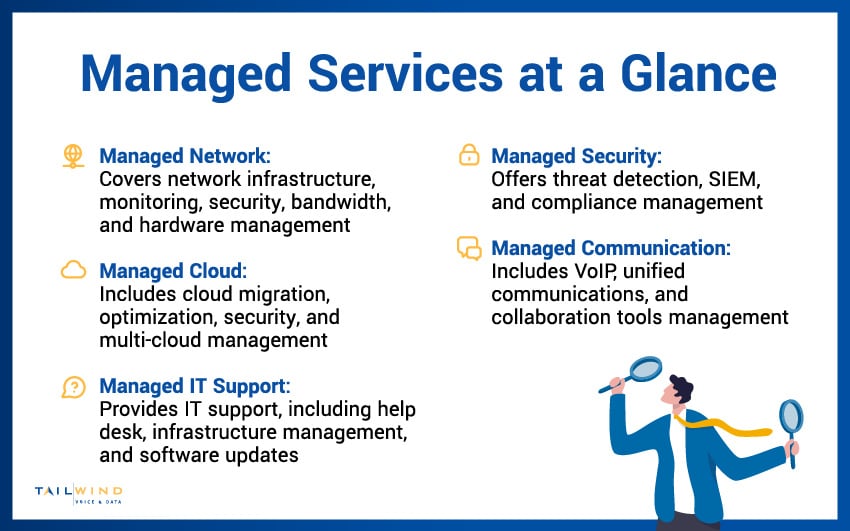
Managed network services handle every aspect of your company's network infrastructure, ensuring that your Local Area Networks (LANs), Wide Area Networks (WANs), and related systems operate seamlessly. These services are built to maintain peak network performance, minimize downtime, and proactively address potential issues.
Typically, managed network services include:
- Network Monitoring: Constant, real-time tracking of network activity to quickly detect anomalies, prevent outages, and maintain smooth operations.
- Security Management: Deployment and management of firewalls, intrusion detection systems, and other safeguards to defend against cyber threats and unauthorized access.
- Bandwidth Management: Monitoring and adjusting bandwidth allocation to prioritize critical applications, avoid congestion, and maintain fast, reliable connectivity.
- Infrastructure Management: Full oversight of networking hardware (like routers, switches, and wireless access points) and software configurations to ensure optimal performance and scalability.
By partnering with a managed network services provider, businesses can ensure their infrastructure is resilient and dependable, a crucial investment, especially considering that nearly 60% of multi-site businesses face network problems at least monthly, with 46% experiencing one to three disruptions per month and 13% seeing weekly issues.²
2. Managed Cloud Services
With cloud computing becoming a cornerstone of modern business, managed cloud services offer expert support to help you navigate, optimize, and secure your cloud environments. These services eliminate the technical complexities and risks often associated with managing cloud infrastructure internally.
Managed cloud services typically involve:
- Cloud Migration: End-to-end support for moving applications, data, and workloads from on-premises systems to cloud platforms with minimal disruption.
- Cloud Optimization: Regular evaluation and adjustment of your cloud resources to reduce waste, control costs, and maximize performance.
- Cloud Security: Proactive security measures to protect sensitive data and applications in the cloud from threats like data breaches, malware, and insider risks.
- Multi-Cloud Management: Coordinating and integrating multiple cloud services (such as AWS, Azure, and Google Cloud) to ensure smooth operation, greater flexibility, and vendor neutrality.
By leveraging managed cloud services, organizations can focus on growth and innovation without being weighed down by the demands of day-to-day cloud management.
3. Managed IT Support Services
Managed IT support services offer businesses comprehensive, ongoing IT assistance to maintain stable, secure, and aligned technology environments that support business goals. They function as an external IT department or an extension of an internal team.
Key components of managed IT support services include:
- Help Desk Support: 24/7 assistance for end-users facing technical problems, ranging from login issues to hardware malfunctions.
- IT Infrastructure Management: Maintenance and administration of critical IT assets like servers, storage systems, desktops, and mobile devices.
- Software Updates and Patch Management: Routine updating of operating systems, business applications, and security patches to ensure systems are protected against vulnerabilities and stay compliant.
With reliable IT support, businesses experience fewer technology-related interruptions, faster issue resolution, and improved employee productivity.
4. Managed Security Services
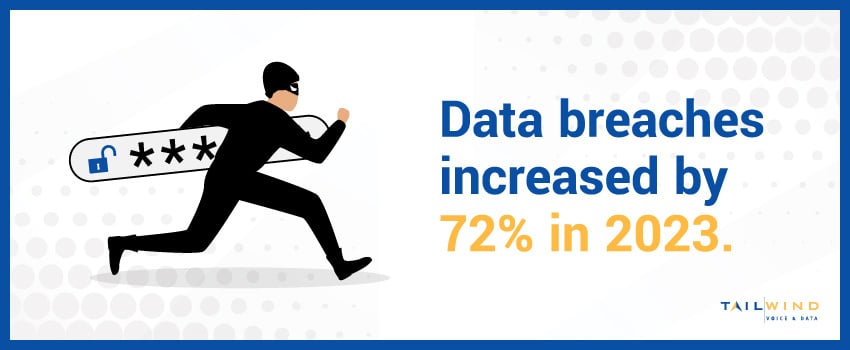
In an era of escalating cyber threats, with the global average cost of a data breach reaching $4.88 million in 2024,³ managed security services have become vital for business survival. These services provide specialized expertise and technology to secure your digital assets and maintain regulatory compliance.
Managed security offerings typically include:
- Threat Detection and Response: Real-time identification of malicious activity and rapid incident response to contain and neutralize threats before they cause significant harm.
- Security Information and Event Management (SIEM): Centralized collection, analysis, and correlation of security data to uncover hidden threats and detect anomalies across your network.
- Compliance Management: Guidance and technical support to help meet industry-specific regulations, such as HIPAA, GDPR, or PCI-DSS, minimizing the risk of costly fines and reputational damage.
Through managed security services, businesses gain peace of mind knowing that seasoned experts are safeguarding their operations around the clock.
5. Managed Communication Services
Effective communication underpins every successful organization. Managed communication services ensure your communication systems are robust, integrated, and secure, enabling employees to collaborate effortlessly regardless of location.
Typical services include:
- VoIP Management: Setup, maintenance, and optimization of Voice over Internet Protocol (VoIP) systems, ensuring crystal-clear voice quality and reliable call connectivity.
- Unified Communications: Integration of diverse communication channels – including email, voice, messaging, and video into a single, user-friendly platform for seamless collaboration.
- Collaboration Tools Management: Optimization, security management, and troubleshooting for leading collaboration platforms like Microsoft Teams, Zoom, and Slack, ensuring they operate effectively across the organization.
With managed communication services, businesses can enhance employee collaboration, boost customer interactions, and support hybrid and remote workforces without compromising quality or security.
6. Managed Backup & Disaster Recovery Services
Managed backup and disaster recovery services protect your business data and ensure you can keep operating after a hardware failure, cyberattack, or natural disaster. These services combine continuous data backup with documented recovery procedures, so when something goes wrong, you can restore systems quickly instead of losing days to manual rebuilds.
Typically, managed backup and disaster recovery services include:
- Automated Data Backup: Scheduled, encrypted backups of critical files, databases, and system images to secure offsite or cloud locations, removing the need for manual processes.
- Disaster Recovery Planning: Documented recovery time objectives (RTOs) and recovery point objectives (RPOs), with tested failover procedures so you know exactly how long restoration will take and how much data could be lost.
- Cloud-Based Replication: Continuous replication of production environments to a secondary cloud location, allowing rapid failover during outages without on-premises hardware investments.
- Ransomware Recovery: Immutable backups designed to resist tampering, combined with restoration playbooks that let you recover clean data without paying a ransom.
For multi-location enterprises, the stakes are especially high. A single ransomware incident or hardware failure at one site can ripple across the network, halting operations company-wide. Managed backup and disaster recovery turns recovery from an emergency scramble into a planned, measurable process.
7. Managed WiFi Services
Managed WiFi services keep your business’s wireless networks reliable, secure, and ready to support employees, customers, and connected devices. For multi-location organizations, these services help maintain consistent coverage and performance across sites with different layouts and device demands.
Managed WiFi services typically include:
-
Access Point Management: Configuration, monitoring, and maintenance of wireless access points to support dependable connectivity throughout each location.
-
Coverage & Performance Optimization: Identifying dead zones, reducing interference, and adjusting wireless settings to accommodate changing traffic and user needs.
-
Guest & Business Network Separation: Keeping customer WiFi traffic separate from internal systems to help protect business data and manage access.
-
Ongoing Monitoring & Support: Detecting connectivity problems, troubleshooting wireless issues, and coordinating on-site assistance when needed.
With managed WiFi, businesses can support everyday activities, from mobile checkout to employee collaboration, while reducing the burden of wireless troubleshooting on internal IT teams.
Key Benefits Of Managed Services For Your Business
Businesses across industries are shifting from break-fix IT to managed services because the model delivers more than just outsourced labor. The right managed services partnership creates measurable improvements in cost, performance, and resilience.
Predictable Costs & Lower Capital Expense
Managed services replace unpredictable repair bills and large infrastructure purchases with a predictable subscription model. You know what you're paying each month, and the burden of investing in new hardware, monitoring tools, and 24/7 staffing shifts to the provider. For finance teams, this turns IT from a volatile capital expense into a stable operating expense.
Access To Specialized Expertise
Hiring full-time specialists in cybersecurity, cloud architecture, and network engineering is expensive, and qualified talent is scarce. A managed services provider gives you access to a team with these skills as part of your service, without the cost or recruiting effort of building it in-house. This is especially valuable when you need niche expertise (like compliance support or multi-cloud management) on demand rather than year-round.
Proactive Issue Prevention
A managed services provider monitors your systems continuously, identifying and resolving problems before they impact users. This shifts your IT posture from reactive, fixing things after they break, to proactive, where issues are caught at the early-warning stage. The result is less downtime, fewer disruptions, and stronger system performance.
Scalability For Multi-Location Growth
Whether you're opening a new location, adding remote workers, or absorbing an acquired business, managed services scale with you. Adding a site, onboarding users, or expanding into a new region doesn't require renegotiating contracts or building new internal capacity. Your provider adjusts service levels to match.
Stronger Security & Compliance Posture
Managed security services bring continuous monitoring, threat detection, and compliance support that few internal teams can match. For businesses subject to HIPAA, PCI-DSS, GDPR, or industry-specific regulations, this reduces both compliance risk and the time your internal team spends preparing for audits.
Frees Internal IT To Focus On Strategic Work
When routine tickets, patching, and infrastructure management are handled externally, your in-house IT team can concentrate on initiatives that drive the business forward: digital transformation projects, integrations, business analytics, and supporting growth. The provider handles the keep-the-lights-on work; your team handles the strategy.
MSP vs MSSP: What's The Difference & Why It Matters
Managed service providers (MSPs) and managed security service providers (MSSPs) are often used interchangeably, but they're not the same thing. The distinction matters when you're choosing a partner, because picking the wrong type can leave critical gaps in either IT operations or security coverage.
What Is An MSP?
An MSP delivers broad IT management across your infrastructure: networks, cloud, help desk, communications, and routine security like firewall management and patching. MSPs handle the day-to-day responsibilities of keeping technology running, and most offer some level of security as part of their service mix.
What Is An MSSP?
An MSSP specializes in cybersecurity. Their services go deeper than what a general MSP typically provides, covering 24/7 security operations centers (SOCs), threat hunting, security information and event management (SIEM), vulnerability assessments, penetration testing, and incident response. An MSSP's focus is detection, response, and compliance, not general IT operations.
When To Choose An MSP, MSSP, Or Both
For most small and mid-sized businesses, a strong MSP that includes managed security services is sufficient. Larger enterprises, regulated industries (healthcare, financial services, government), or businesses handling sensitive customer data often need both: an MSP for IT operations and an MSSP, or an MSP with a dedicated security practice, for specialized threat detection and compliance work. Some providers offer both under one roof, which simplifies vendor management and ensures security and IT teams aren't working in silos.
Managed Services Pricing Models & Cost Factors
Managed services pricing varies widely depending on the model your provider uses and the scope of what you're outsourcing. Understanding the most common pricing structures helps you compare proposals accurately and pick a model that fits both your IT environment and your budget.
Per-Device Pricing
You pay a flat monthly fee for each managed device, servers, laptops, network equipment, or mobile devices. This model works well for businesses with predictable hardware fleets and limited per-user device counts. It's straightforward to budget but can become expensive as your device inventory grows or users adopt multiple devices.
Per-User Pricing
You pay a set fee per employee, regardless of how many devices that person uses. This model is well-suited for teams where users routinely have a laptop, mobile phone, and other endpoints, and it makes onboarding new staff a clean cost calculation. The flat per-user rate also simplifies scaling as headcount changes.
Tiered Packages
Providers offer bundled service tiers (often labeled basic, advanced, and premium) at fixed monthly rates. Each tier includes a defined scope of services, escalating from foundational monitoring at the lower tiers to comprehensive coverage with faster SLAs at higher tiers. Tiered pricing gives you a clear upgrade path as needs grow.
À La Carte Pricing
You pay only for the specific services you need, for example, help desk support without managed cloud, or managed security without endpoint management. À la carte structures work for businesses with internal IT capacity that just need to fill specific gaps, but they require careful service definition upfront to avoid coverage holes.
Value-Based Pricing
Pricing is tied to outcomes the provider delivers (uptime targets, security incident response times, cost-reduction milestones) rather than per-device or per-user metrics. This model aligns provider incentives with your business results but requires clearly defined KPIs and trust between both parties. It's most common in mature managed services relationships and larger enterprise engagements.
Cost Factors That Drive Your Total Spend
Beyond the pricing model itself, several variables affect what you actually pay:
- Scope of services: Full IT outsourcing costs more than targeted services like managed security or backup alone.
- SLA tier: Faster guaranteed response times and higher uptime commitments raise the price.
- Location count and complexity: Multi-site environments, especially across regions or time zones, cost more to manage than single-site setups.
- Compliance requirements: Industries with strict regulations (healthcare, financial services) require additional controls, reporting, and certifications that increase service costs.
- Onboarding and migration: Initial setup, asset audits, and migration work are often one-time costs separate from the recurring monthly fee.
How To Choose The Right Managed Services: 5 Key Tips
Selecting the right managed services for your business requires careful consideration and evaluation. Here are some tips to help guide your decision:
Assess Your IT Needs
Begin by conducting a thorough evaluation of your current IT environment. Identify gaps, inefficiencies, or areas that require specialized knowledge that your internal team may lack. This might include network management, cybersecurity, cloud migration, or compliance support. Understanding your specific needs will help you determine whether you need full IT outsourcing or targeted services to complement your in-house capabilities.
Define Your Business Goals
Clarify your short-term and long-term business objectives before choosing a managed services provider (MSP). For example, if enhancing cybersecurity is critical, prioritize MSPs that specialize in security monitoring, threat detection, and compliance services. On the other hand, if your goal is rapid growth or digital transformation, focus on providers with strong cloud services, infrastructure management, and scalability options. Making your business goals the foundation of your decision ensures the partnership will support your overall strategy.
Prioritize Scalability
Look for managed services that can easily adapt to your business's future growth. Whether you expand to new locations, add remote teams, or increase your customer base, your MSP should be flexible enough to scale resources up or down as needed. Scalable services minimize the risk of outgrowing your provider and save you from costly and time-consuming transitions in the future.
Evaluate Provider Expertise
A provider’s experience and reputation are key indicators of their ability to support your business effectively. Research their history in delivering the services you need and look for evidence of their success, such as customer reviews, case studies, and industry awards or certifications (like ISO, SOC, or Microsoft partnerships). An MSP with deep expertise can offer valuable insights, anticipate challenges, and deliver a higher quality of service.
Focus On Customization
Every business has unique challenges, operational styles, and regulatory requirements. A quality MSP should offer customizable service packages that align with your specific needs rather than forcing you into a generic plan. Ask potential providers how they tailor their services for different industries and business sizes, and look for flexibility in their service agreements so you can adjust as your needs evolve.
Types Of Managed Services FAQs
Managed Services vs Break-Fix IT: What's The Difference?
Break-fix IT is a reactive model, you call a technician when something goes wrong and pay per incident. Managed services is proactive: a provider continuously monitors your systems, prevents issues before they cause downtime, and charges a predictable monthly fee. The break-fix model can seem cheaper if nothing breaks, but downtime, emergency repair rates, and the unpredictability of one-off bills usually make managed services more cost-effective over time, especially for businesses that depend on uptime.
What's The Difference Between Managed IT And IT Services?
IT services is a broad category covering anything from one-time projects (like installing a new server) to ongoing consulting. Managed IT services is a specific subset where a third-party provider takes ongoing, proactive responsibility for managing and maintaining your IT environment under a subscription contract. The key difference is duration and commitment: IT services can be one-off or transactional, while managed IT services is a continuous, contracted relationship with defined service levels.
What Is A Fully Managed IT Service vs Co-Managed?
A fully managed IT service means a provider handles your entire IT environment, networks, cloud, security, help desk, and end-user support, as your external IT department. Co-managed IT is a hybrid: your in-house IT team owns parts of the environment, while the provider supplements with specialized expertise, after-hours coverage, or specific functions like cybersecurity monitoring. Full management suits businesses without internal IT staff; co-management works when you have an internal team that needs scaling or specialist support.
What Industries Benefit Most From Managed IT Services?
Industries with strict compliance requirements, high uptime needs, or multi-location operations gain the most from managed services. Healthcare and medical practices benefit from HIPAA-compliant infrastructure and 24/7 monitoring. Financial services rely on secure, regulated environments and rapid incident response. Retail and restaurants need consistent connectivity across locations. Manufacturing depends on operational technology and production-line uptime. Any business that can't tolerate downtime or lacks the budget to build deep internal IT expertise typically benefits from a managed services partnership.
When Should A Business Switch To Managed IT Services?
Common triggers include repeatedly missing deadlines because IT issues consume staff time, struggling to recruit qualified IT talent, facing compliance audits without internal expertise, opening new locations and outgrowing current support, or seeing rising downtime costs and security incidents. If your internal team is firefighting rather than driving strategic initiatives, or if your IT budget has become unpredictable due to emergency repairs, managed services is worth evaluating. Many businesses also switch when leadership wants more predictable IT costs and stronger SLAs.
What's The Difference Between MSP And MSSP Providers?
An MSP manages a range of IT functions, including networks, cloud systems, help desk support, and routine security. An MSSP specializes in cybersecurity, with services that may include continuous security monitoring, threat detection, and incident response. Businesses needing both operational support and specialized security can use separate providers or choose one that offers both. The right combination depends on your internal capabilities, security risks, and compliance requirements.
Simplify Your Network Management With TailWind
Managed services enable businesses to access cutting-edge technology and expertise without the burden of managing complex IT systems in-house. Whether you run a small startup or a multi-location enterprise, the right managed services can provide the scalability, flexibility, and support needed to grow in today's ever-evolving tech landscape.
TailWind offers multi-location enterprises comprehensive network management services designed to ensure seamless operations across your entire network infrastructure. Our NOCaaS (network operations center as a service) solution goes beyond traditional managed services, providing a local, scalable, accountable, and complete approach to solving your network problems quickly, or helping you avoid them altogether.
Ready to simplify your enterprise IT with NOCaaS? Connect with the TailWind team today!
Sources: