TL;DR
-
A successful business phone system installation depends far more on the infrastructure prepared before install day, including network bandwidth, QoS, PoE switching, and cabling, than on the phones themselves.
-
Cost depends on the deployment model: cloud VoIP typically runs $15 to $40 per user monthly, while on-premises hardware runs into the thousands upfront, with cabling and field work driving the variance.
-
Small single-site businesses can self-deploy a cloud system over existing internet in days, while multi-location enterprises need centralized provisioning, standardized cabling, and coordinated cutovers across every site.
-
Number porting is usually the longest lead time, typically two to four weeks, so it, rather than the physical install, sets the realistic go-live date.
Your phone system is the infrastructure behind each team collaboration and customer interaction. When it works, nobody notices. When it doesn't – dead transfers, dropped calls, extensions that ring the wrong desk – it’ll show up in your productivity and customer satisfaction metrics.
A thoughtful installation is what sets business phone systems up for success. But getting this process right requires more than a checklist. It requires infrastructure expertise, project coordination, and the ability to troubleshoot problems as they emerge.
In this guide, we’ll walk you through how to install a business phone system from planning through go-live, with the considerations that matter most for commercial environments.
Step 1: Choose Your Business Phone System Type Before Installation Begins
There are three primary phone system architectures used in commercial environments today, and the right choice will shape everything from your cabling requirements to ongoing management.
Let’s take a quick look at the different types below:
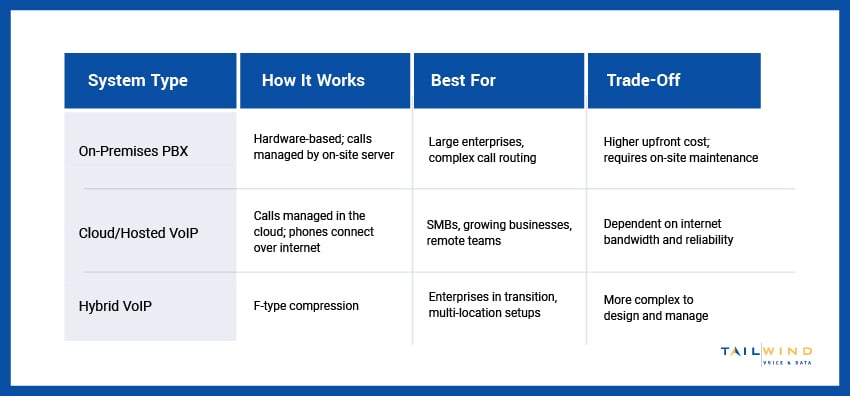
For most businesses deploying new systems in 2026, cloud-based or hybrid VoIP is the standard choice. But the infrastructure that supports it, including your network capacity, cabling, PoE switches, and carrier connectivity, still needs to be right regardless of which platform sits on top.
Not sure which option is right for your needs? TailWind’s carrier services team can work with you to ensure your voice infrastructure supports the quality your communications demand.
Step 2: Assess Your Infrastructure Before Business Phone Setup
Before unboxing even a single phone, perform an infrastructure assessment to see what you're working with and what needs to change. Skipping this step is the most common reason business phone installations run into problems during deployment.
Network Readiness
VoIP phone systems are sensitive to network conditions in ways that data applications aren't. Packet loss, jitter, and latency – even at levels that wouldn't affect file downloads or web browsing – can degrade call quality, frustrating your employees and customers alike.
Before installation, make sure to assess:
- Available internet bandwidth and whether it supports the number of simultaneous calls planned
- QoS (Quality of Service) configurations on your routers and switches
- Latency to your VoIP provider's servers or your hosted PBX platform
You’ll also need to check that your network switches support PoE (Power over Ethernet) for desk phones, since most modern IP phones require PoE to operate.
Cabling Infrastructure
Every desk phone endpoint needs a wired Ethernet drop. If your cabling infrastructure isn't already in place, or if existing runs don't reach your planned phone locations, that work needs to happen before installation day.
At TailWind, our structured cabling services handle exactly this – designing and installing the Ethernet infrastructure that phone systems run on, certified to TIA standards and tested end-to-end.
Carrier And SIP Trunk Readiness
On-premises or hybrid phone systems need a carrier connection – either traditional PRIs or, more commonly, SIP trunks from a VoIP carrier.
Confirm your SIP trunk provider, capacity (number of concurrent calls), and whether your internet circuit has sufficient bandwidth reserved for voice before the system goes live.
Step 3: Plan The Office Phone System Installation
Good planning before installation day is what makes installation day go smoothly. Here's what you need to define before the first phone gets plugged in:
- Extension Map: Document every extension number, the user or function it serves, and the physical location of the endpoint. This becomes your reference for programming and troubleshooting.
- Call Flow Design: Define how inbound calls are handled – auto-attendant menus, ring groups, hunt groups, and call queues. This programming work takes longer than most people expect and should be drafted and reviewed before installation, not improvised during it.
- Voicemail and Directory Setup: Plan your voicemail boxes, greetings, and directory listings. For larger deployments, you can save time by collecting this information from users in advance (rather than chasing it post-install).
- Number Porting Timeline: If you're porting existing numbers from another carrier, initiate the port request well before your target go-live date. Port requests typically take 2–4 weeks.
- Staging Environment: Pre-staging phones at a central location before deployment to individual desks or locations allows configuration to be validated before field installation.
For multi-location deployments, TailWind’s stage and configuration services handle pre-staging and configuration of phone equipment at our facility before it ships to each site – reducing on-site installation time and ensuring every device arrives ready to plug in.
Step 4: The Installation Process: How To Set Up A Business Phone System
Once planning is complete, it’s time to install. Deployment, programming, and testing happen in stages, which enables your teams to minimize disruption and catch problems before the actual launch.
Physical Office Phone Installation
The physical office phone installation should follow a predictable process for each endpoint. Here’s an example:
- Connect to the Network: Plug a Cat6 Ethernet cable from the wall jack into the phone's LAN port. If the phone has a built-in switch, a second cable connects from the phone's PC port to the workstation – preserving the single wall jack without adding additional drops.
- Check the Power: Most IP desk phones are powered via PoE from the network switch, eliminating the need for a separate power adapter at each desk.
- Provision the Phone: On managed VoIP platforms, phones will typically auto-provision when connected. Verify that each phone boots to a registered state before moving to the next endpoint.
- Label and Document: Mark each phone with its extension number, then update your extension map with the physical MAC address of each device. This documentation will be critical for troubleshooting and future moves, adds, and changes.
Programming Your Office Phone Setup
Once phones are physically deployed and registered, you’ll use the PBX or cloud portal to configure system-level programming, such as:
- Auto-attendant greetings and menu options
- Ring groups, call queues, and hunt group sequences
- Individual extension features (call forwarding, do not disturb, voicemail-to-email)
- Outbound caller ID per user or per location
Don’t forget to test every inbound call path and ring group before your cutover date.
Phone System Installation For Small Business vs Enterprise: Key Differences
The fundamentals of phone system installation are the same regardless of business size – but scale introduces complexity that small-business guides won’t address. Let’s explore what the process looks like for small businesses vs. multi-location enterprises.
Small Business
Single-location businesses with fewer than 25 users can deploy a cloud VoIP system over an existing internet connection. This is typically the fastest and most cost-effective path.
Physical installation for VoIP systems is straightforward: connect the phones, provision via the cloud portal, configure the auto-attendant, and you're live. Just make sure that your network is ready (Do you have sufficient bandwidth? Did you configure QoS?) and account for number porting delays.
Enterprise Business
Multi-location enterprises need consistency across each site – the same phone models, call flow behavior, and configuration standards. However, this consistency requires centralized management and coordination.
Some considerations for enterprise business phone system installation include:
- Centralized provisioning through a cloud PBX platform that manages all locations from a single admin portal.
- Standardized cabling and switch specifications across sites so every phone endpoint is built the same way.
- Coordinated cutover timing, particularly when porting numbers from a legacy system, to minimize disruption across all locations simultaneously.
- On-site technical presence at each location during cutover to catch and resolve issues in real time.
Ready to roll out phone systems across multiple enterprise locations? TailWind’s nationwide field services team provides coordinated on-site deployment, so every location is cut over on schedule with qualified technicians on the ground.
What Does A Business Phone System Installation Cost?
Installation cost depends far more on your infrastructure and deployment model than on the phones themselves. A cloud VoIP system that runs over a network you already have is inexpensive to stand up. An on-premises or multi-site deployment that needs new cabling, switches, and coordinated field work is a different order of investment.
What Drives The Cost
Most of the budget goes to a handful of factors, and only some of them are the phone system itself:
-
Deployment Model: Cloud VoIP carries little upfront cost, while on-premises and hybrid systems require PBX hardware and a larger initial outlay.
-
Network Readiness: If your switches lack PoE or your bandwidth will not support the call load, switch upgrades and network engineering work get added before a single phone is provisioned.
-
Cabling: Every new desk-phone location that is not already wired needs an Ethernet drop, which is labor and materials, not a line on your monthly plan.
-
Number Of Locations: Multi-site rollouts add staging, per-site field labor, and coordinated cutovers that single-location guides rarely account for.
-
Desk Phones: Hardware is optional if your team uses softphone apps, but physical IP phones typically run $80 to $400 each.
Typical Price Ranges
Software pricing is the easiest part to pin down; infrastructure is where the real variance lives. As a 2026 benchmark:
-
Cloud VoIP (standard to mid-tier): roughly $15 to $40 per user per month.
-
Cloud VoIP (advanced or enterprise features): $50+ per user per month.
-
On-premises or hybrid PBX: several thousand dollars upfront in hardware, often $500 to $2,000+ per user.
-
Traditional landlines: around $50 to $100 per line per month.
Expect taxes and regulatory fees to add roughly 15 to 25 percent on top of any VoIP plan. Treat these as starting points: your cabling, switch, and multi-site field costs are quoted per project, not per seat, and managing telecom expenses across locations is often where the recurring spend actually adds up.
That drops the table note entirely, so the whole Cost section is now bullets and prose only, consistent with the rest of the article.
One-Time vs Recurring Costs
Separating the two makes budgeting cleaner. One-time costs cover cabling, switches, desk phones, staging, professional installation, and number porting. Recurring costs are your per-user subscription plus taxes and any per-minute or toll charges. Cloud systems shift more of the total into predictable monthly spend; on-premises systems front-load it into hardware you own.
5 Common Business Phone Setup Mistakes To Avoid
Even the most thoroughly planned business phone system installations can run into problems. Here’s what to avoid:
1. Skipping The Network Assessment
VoIP call quality issues almost always trace back to network problems like too little bandwidth, missing QoS, or jitter on congested links. Test before you deploy, not after.
2. Underestimating Number Porting Time
Port requests take time – probably more time than you expect. Build porting lead time into your project schedule and have a fallback plan if the port doesn't complete on cutover day.
3. Failing To Pre-Stage For Large Deployments
Configuring each phone on-site at every one of your locations is slow and error-prone. Pre-staging and pre-provisioning them before deployment day will dramatically reduce installation time and issues.
4. Missing The Call Flow Design
Figuring out your auto-attendant menus and ring groups during installation is the single biggest time sink in business phone deployments. Complete this work before installation begins.
5. Forgetting About E911
Cloud VoIP systems require E911 configuration – ensuring that emergency calls from each location correctly identify the physical address of the caller. This is a legal requirement, not optional.
Business Phone System Installation FAQs
Can I Set Up My Own Business VoIP Phone System Myself?
Yes, for a small, single-location setup. A cloud VoIP system with a handful of users can be self-installed: sign up with a provider, connect the phones to your network, provision them through the cloud portal, and configure your auto-attendant. The catch is that your network has to be ready first, meaning enough bandwidth, QoS configured, and PoE on your switches, and number porting still takes a few weeks regardless of who does the work. Multi-location or on-premises deployments are a different story, since coordinated cutovers, cabling, and per-site testing usually call for professional support.
Do I Need To Change My Number When Switching Providers?
No. Number portability lets you keep your existing business numbers when you move to a new VoIP or telephone provider, so customers reach you exactly as before. You initiate a port request with your new provider, and they coordinate the transfer with your old carrier. The one thing to plan for is timing: ports typically take two to four weeks, so start the request well before your target go-live date and keep the old service active until the port completes.
How Long Does It Take To Install A Business Phone System?
It depends on the size and complexity of your deployment. A small cloud VoIP setup over an existing, VoIP-ready network can be live in a day or two once numbers are ported. A multi-location rollout that involves new cabling, switch upgrades, staged equipment, and coordinated cutovers across sites can take several weeks. Number porting is usually the long pole in the schedule at two to four weeks, so that, rather than the physical install, tends to set your realistic go-live date.
What Is The Cheapest Way To Set Up A Business Phone?
The most cost-effective option for most small businesses is a cloud VoIP system running over your existing internet connection. There is no PBX hardware to buy, installation is minimal, and you pay a predictable per-user monthly fee instead of upfront line costs. To keep it lean, confirm your bandwidth and QoS can handle the call volume before you commit, use the softphone app where you can instead of buying desk phones, and account for number porting so it does not delay your launch.
Streamline Your Business Phone System Install With TailWind
The difference between a phone system that performs reliably and one that creates daily frustration often comes down to decisions made months before installation day. Avoiding the system install failures that result from incomplete planning or underestimated timelines isn’t impossible, but it does take coordination.
TailWind is here to help streamline your business phone system installation. Our experts handle everything from infrastructure assessment and cabling to on-site deployment and carrier coordination, so you’re covered whether you're deploying a single new system or coordinating a rollout across multiple locations.
Reach out today to get started – and let's build a phone system your business can depend on.