TL;DR
-
Ethernet is a wired connection built for speed, low latency, and security, while WiFi is wireless and built for mobility and flexibility.
-
For performance-critical gear like POS systems, servers, and VoIP phones, Ethernet delivers faster (up to 10 Gbps) and more reliable connections than WiFi.
-
WiFi adds easy mobility and scalability for laptops, phones, and guests, and WiFi 6 has narrowed much of the old speed and reliability gap.
-
Most businesses get the best results from a hybrid network that wires high-demand devices and uses WiFi everywhere mobility matters.
When it comes to setting up your business network, a few questions always come up: Ethernet vs WiFi – which is better? Is Ethernet faster than WiFi? Is it more reliable? And most importantly, what’s the right setup for your business?
Both Ethernet and WiFi are essential for modern businesses, and each offers clear advantages depending on your environment, goals, and daily operations. In this guide, we’ll explore the difference between WiFi and Ethernet, compare WiFi types, and help you decide which is best for your network.
What Is Ethernet?
Ethernet refers to a wired networking standard that connects devices using physical cables – typically Cat5e, Cat6, or Cat6a – to a router, switch, or modem. Because it offers consistent performance and strong security, Ethernet remains the foundation of most business networks.
Some benefits of Ethernet include:
- Faster Speeds: Capable of up to 10 Gbps or higher with the right cabling.
- Low Latency: Ideal for real-time applications like VoIP and video conferencing.
- Stronger Security: Harder to intercept than wireless networks.
- Higher Stability: Not affected by signal interference or distance as long as cable lengths are within spec.
- Simplified Troubleshooting: Identifying and fixing issues is often easier with a wired infrastructure.
Many organizations rely on Ethernet for systems where dependable connectivity is essential, like retail point-of-sale systems, healthcare EMRs, or financial trading platforms.

What Is WiFi?
WiFi allows devices to connect wirelessly to a network using radio signals transmitted from wireless access points (WAPs). It provides mobility, flexibility, and ease of access for users across a building or campus.
Benefits of WiFi include:
- Improved Mobility: Users can roam freely without losing connection.
- Easier Management: No need to run cables to every device.
- Greater Scalability: Easy to connect new users and devices.
- Increased Flexibility: Perfect for mobile devices, guests, or hard-to-cable areas.
At TailWind, we install business-grade WiFi networks for distributed enterprises designed to minimize dead zones, reduce interference, and provide consistent performance across all locations.
WiFi vs Ethernet: Primary Differences
Let’s tackle the most common question: Is Ethernet faster than WiFi? The short answer is yes, in most cases.
How Much Faster Is Ethernet Than WiFi?
Ethernet connections are typically faster than WiFi, as they’re less affected by interference or signal loss. Here’s a quick breakdown:
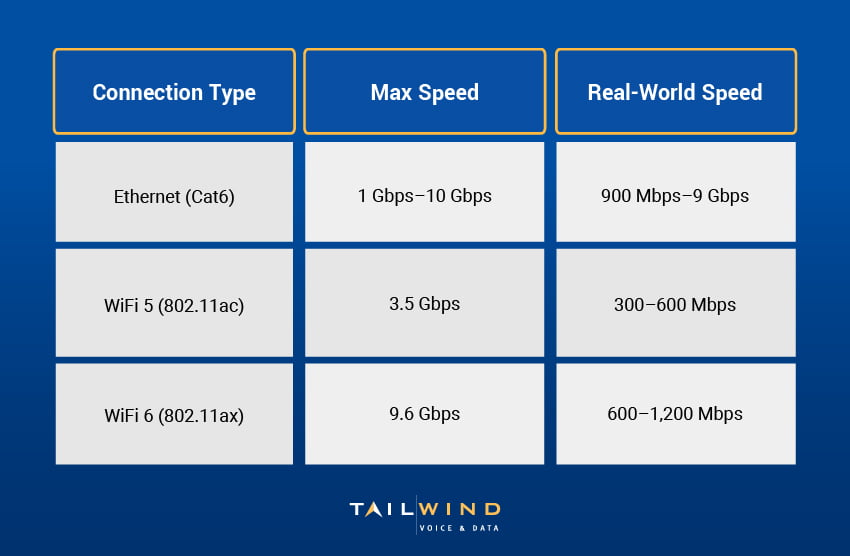
WiFi 6 has narrowed the gap, but Ethernet remains the best option when speed is a top priority.
Which Has A Longer Range?
Ethernet connections don’t have a traditional “range.” A device is either plugged in or not, and the signal usually remains strong for up to 100 meters (about 328 feet) of cable length.
WiFi, however, depends on a few factors:
- WiFi 5 Range: Offers indoor coverage of around 100–150 feet.
- WiFi 6 Range: Slightly better due to improved beamforming and OFDMA.
Obstructions like walls, floors, and electronic devices can weaken WiFi signals. For large spaces, businesses often combine Ethernet with multiple wireless access points to maintain full coverage.
Is Ethernet Better Than WiFi For Reliability?
Yes, Ethernet is more reliable than WiFi for critical applications. It provides a steady, uninterrupted connection that isn’t affected by interference or congestion, which enables it to deliver low latency and predictable speeds.
That’s why we often recommend Ethernet for credit card terminals, servers, and VoIP desk phones. However, WiFi has come a long way. With the right hardware and proper setup, business-grade WiFi can be reliable enough for most employees and guests.
When Did WiFi 6 Launch?
WiFi 6 was officially released in 2019 and became widely adopted soon after. It introduced several important improvements, including:
- Higher throughput for data-heavy workloads
- Better efficiency for multiple devices connected at once
- Improved energy management for IoT and smart devices
- Enhanced security with WPA3 encryption

If your business is still running on WiFi 5, it may be time to consider upgrading. A 2024 report found that 37% of businesses have already deployed WiFi 6E,1 which builds on the WiFi 6 standard and extends performance into the 6 GHz band. For most organizations, upgrading to WiFi 6 helps create a more stable, secure foundation that can support new technologies.
WiFi Types & Device Considerations
Understanding which WiFi generation your devices use can help you make better upgrade decisions.
- WiFi 5 (802.11ac): Common on devices manufactured from around 2014 through 2019.
- WiFi 6 (802.11ax): Standard on newer laptops, phones, and access points.
- WiFi 6E: Adds a 6GHz band for even lower interference but requires compatible devices.
Since WiFi 6 is backward compatible with WiFi 5 and earlier, upgrading your network doesn’t mean older devices become useless – but you’ll get better performance on newer hardware.
Does Ethernet Affect WiFi?
Ethernet and WiFi coexist in most networks. However, offloading high-bandwidth devices (like streaming boxes or VoIP phones) to Ethernet can improve WiFi performance for wireless users by reducing congestion.
At TailWind, we often recommend a hybrid network design that uses both Ethernet and WiFi. This setup strikes a balance between performance and flexibility, while reducing overall congestion.
When To Choose Ethernet vs WiFi
If you’re still not sure which option is right for your needs, here are our recommended connectivity types for common use cases:
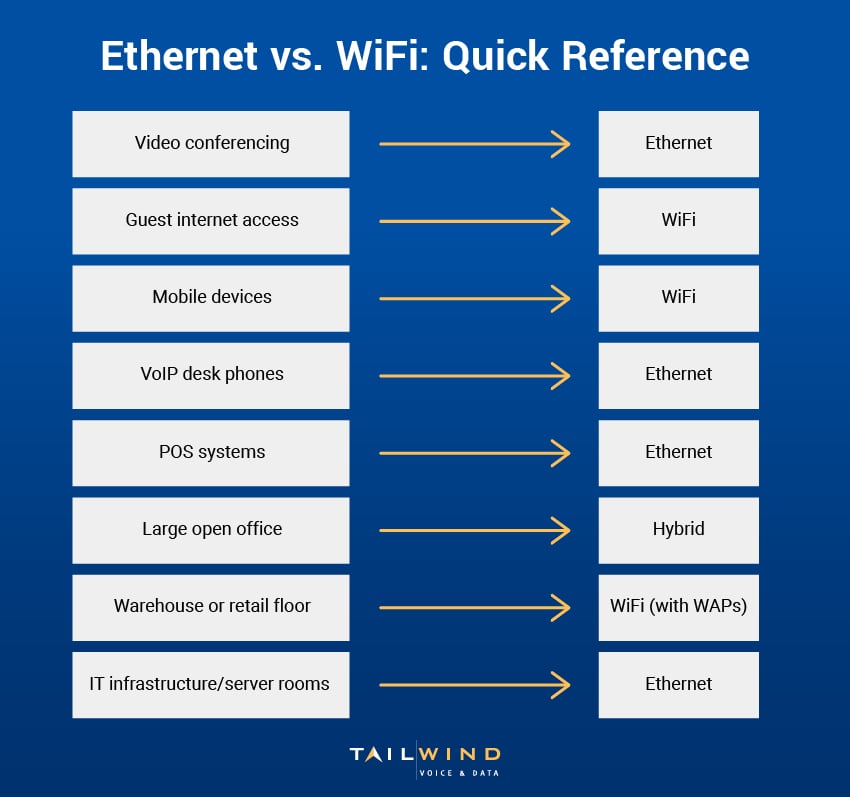
Typically, Ethernet is better for devices or applications that demand constant, high-speed connections. WiFi is more flexible and convenient, allowing employees and guests to stay connected anywhere in your workspace.
Ethernet vs WiFi FAQs
What Is The Difference Between Ethernet And WiFi?
Ethernet is a wired connection that links devices through physical cables, while WiFi connects devices wirelessly over radio signals from access points. That core distinction drives everything else: Ethernet trades mobility for consistent, high-performance connections, and WiFi trades some speed and stability for flexibility and easy access. Ethernet runs on cabling like Cat5e, Cat6, or Cat6a into a router or switch, while WiFi reaches devices through wireless access points across a building. For most businesses, the two aren't competitors but complements, each suited to different jobs.
Is Ethernet Faster Than WiFi, And By How Much?
Yes, Ethernet is faster than WiFi in most cases. With the right cabling, Ethernet handles speeds of 10 Gbps or higher, and because it isn't affected by interference or signal loss, real-world performance stays close to those numbers. WiFi speeds vary with distance, obstructions, and the number of connected devices, so actual throughput often falls well below the theoretical maximum. WiFi 6 has narrowed the gap considerably, but when raw speed is the priority, Ethernet still comes out ahead.
Is Ethernet More Reliable Than WiFi For Business?
Yes, Ethernet is more reliable than WiFi for critical applications. A wired connection delivers steady, predictable performance that isn't disrupted by interference or network congestion, which is why it's the better choice for credit card terminals, servers, and VoIP desk phones. WiFi has improved a lot, and with the right hardware and setup, business-grade wireless is reliable enough for most employees and guests. For anything where downtime is costly, though, a wired link remains the safer bet.
Is An Ethernet Connection More Secure Than WiFi?
Ethernet is generally more secure than WiFi because the data travels through physical cables rather than the open air. To access a wired network, someone typically needs a direct physical connection, which makes traffic harder to intercept than wireless signals. WiFi can still be secured well with strong encryption like WPA3, but it carries more inherent exposure. For organizations handling sensitive customer data or working in regulated industries, Ethernet's added security is a meaningful advantage.
What Is The Range Of Ethernet Compared To WiFi?
Ethernet doesn't really have a range in the wireless sense: a device is either plugged in or it isn't, and the signal stays strong for up to 100 meters (about 328 feet) of cable. WiFi coverage depends on the standard and the environment, with WiFi 5 reaching roughly 100 to 150 feet indoors and WiFi 6 doing slightly better thanks to improved beamforming. Walls, floors, and electronics all weaken wireless signals, so larger spaces usually pair Ethernet with multiple access points.
Can You Use Ethernet And WiFi On The Same Network?
Yes, and most business networks run both. Ethernet and WiFi coexist easily, and a hybrid design often delivers the best results. Moving high-bandwidth devices like streaming boxes or VoIP phones onto Ethernet can actually improve WiFi performance for everyone else by reducing wireless congestion. This kind of setup balances performance and flexibility: wired connections handle the demanding, stationary equipment, while WiFi keeps laptops, phones, and guests connected anywhere in the workspace.
When Should You Choose Ethernet vs WiFi For Your Office?
Choose Ethernet for devices and applications that need constant, high-speed, secure connections, such as point-of-sale systems, servers, healthcare EMRs, financial platforms, and VoIP desk phones. Choose WiFi when mobility and convenience matter most, like laptops, mobile devices, guest access, and hard-to-cable areas. In practice, most offices benefit from a mix of both, using wired links for performance-critical gear and wireless coverage for everything that moves. The right balance depends on your environment, daily operations, and long-term goals.
Choose The Right Setup With TailWind
So, which is better: Ethernet or WiFi? The truth is, they’re complementary, not competitive. In most cases, WiFi is better for supporting mobility and guest access, while Ethernet is better for apps that need security, speed, and consistency.
At TailWind, we build networks tailored to your environment, user needs, and long-term goals. Whether you’re upgrading your infrastructure or connecting multiple locations, we’ll help design solutions that work with services like network engineering, wireless access point installation, structured cabling, and end-to-end IT infrastructure support.
Ready to build a faster, more reliable network for your business? Contact TailWind today to get started!
Sources: