TL;DR
-
An MDF is the building’s main network hub, while IDFs extend connectivity to specific floors or areas.
-
Using both MDF and IDF rooms can improve performance, reduce cable runs, simplify troubleshooting, and support network growth.
-
A reliable MDF and IDF setup depends on secure room placement, high-speed backbone links, organized cabling, proper cooling, and proactive monitoring.
-
For businesses with larger or multi-floor environments, this structured approach helps keep networks more stable, scalable, and easier to manage.
A Main Distribution Frame (MDF) is the central point in a building where external communication lines connect to the internal network. An Intermediate Distribution Frame (IDF) extends that connection to individual areas or floors, linking end-user devices to the MDF.
Cables from outside the building enter the MDF, which serves as the main hub. From there, connections run to one or more IDFs, typically located closer to workstations or user endpoints. For example, a business may place the MDF on the ground floor, with IDFs on each upper floor to distribute connectivity efficiently.
In this guide, we’ll compare MDF and IDF setups, explain how they work together, and help you choose the right configuration for your IT infrastructure.
What Does IDF Mean In Networking?
An IDF (Intermediate Distribution Frame) is a secondary network distribution point that connects to the MDF room and extends connectivity to specific areas within a building or across multiple locations. IDFs:
- House network equipment like switches, fiber patch panels, and rack-mounted hardware for local area connections.
- Distribute network traffic from the MDF to individual workstations, access points, and devices.
- Reduce network congestion by decentralizing connections across different locations.
- Connect to the MDF via fiber optic or high-bandwidth Ethernet cabling to maintain fast and reliable data transmission.
IDF rooms are typically placed on different floors of a large building or in separate sections of a corporate campus to ensure stable network connections across all endpoints.
What Is An MDF Room?
An MDF (Main Distribution Frame) room serves as the primary hub for a business’s network infrastructure. It’s the central point where external network connections enter the facility and are distributed to IDFs and other network components. MDF rooms:
- House the core network equipment, including routers, core switches, firewalls, and patch panels.
- Connect internet service providers (ISPs) and external telecom lines.
- Extend network reach throughout a facility by connecting to multiple IDF locations.
The MDF room is typically more secure and climate-controlled than IDFs, as it contains critical networking and telecom hardware that must remain operational at all times.
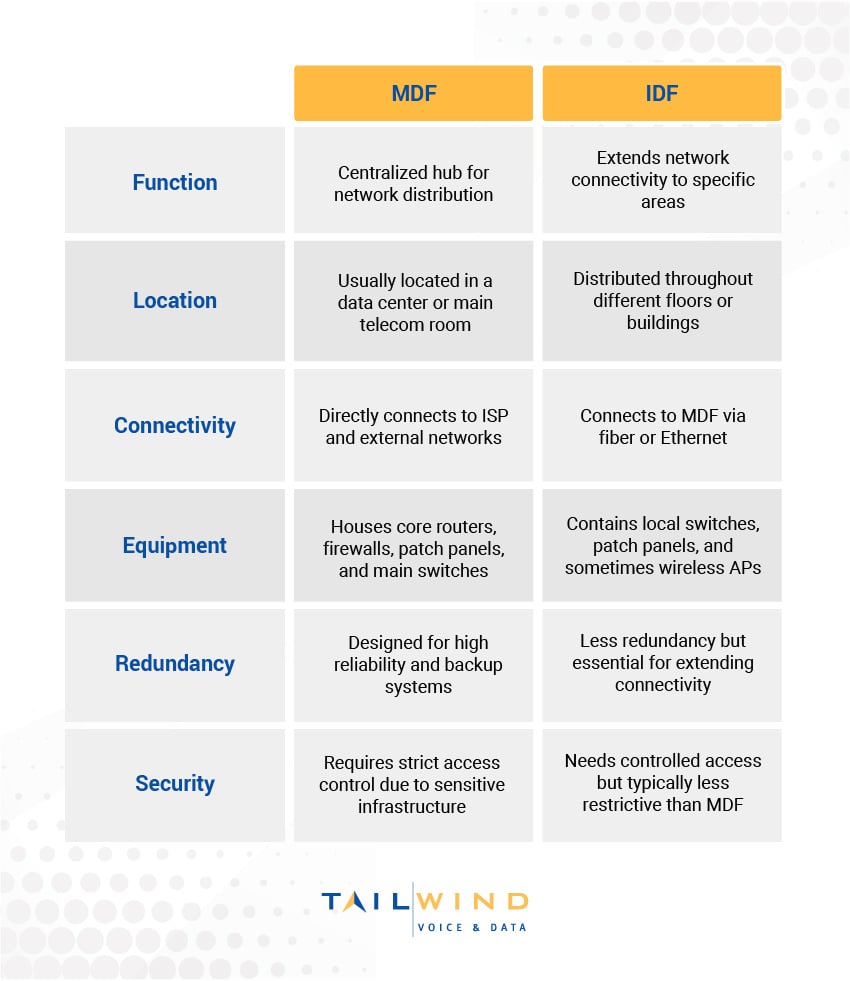
MDF vs IDF: Key Differences
While both MDF and IDF rooms are integral components of a network, they serve different functions. Here’s a quick breakdown of how they stack up:
Benefits Of Using Both MDF And IDF In A Network
Having both an MDF and IDF structure in a networked environment can provide several advantages for your business, including:
- Improved Network Performance: Distributing network traffic across multiple IDFs can help organizations reduce congestion and optimize data flow.
- Scalability for Expanding Networks: Businesses growing into multi-floor buildings or multiple sites benefit from an MDF and IDF setup, making it easier to expand connectivity without overloading a single network hub.
- Reduced Cable Lengths and Costs: IDF locations allow for shorter Ethernet cable runs, which improves signal strength and reduces the cost of long cable deployments.
- Better Network Redundancy: A structured network approach ensures failover capabilities, keeping critical systems online even if one segment experiences downtime.
- Easier Maintenance and Troubleshooting: IT teams can isolate network issues more efficiently by segmenting traffic through IDFs rather than diagnosing problems at a single central hub.
The combined power of MDF and IDF setups creates a network ecosystem that adapts to your organization's physical space while maintaining performance standards. Companies that invest in this structured approach often find their networks more reliable during peak usage times, easier to maintain over the long term, and much simpler to expand as business needs change.
Setting Up An MDF And IDF Network: Best Practices
The efficiency, security, and performance of an MDF and IDF network depend on thoughtful implementation. Here are some best practices to help optimize your network infrastructure:
1. Proper Location & Security Controls
MDF rooms need placement in secure, climate-controlled environments with restricted access protocols. The ideal location protects your core networking equipment from environmental hazards while offering enough space for proper equipment layout and future expansion. Security measures should include access control systems, monitoring, and proper documentation of all personnel entering these sensitive areas.
IDF locations also require thoughtful security measures, especially in shared buildings or multi-tenant spaces. While typically smaller than MDF rooms, these intermediate connection points still contain valuable equipment and represent potential vulnerability points if not properly secured. Regular security audits of MDF and IDF spaces help maintain the integrity of your network infrastructure.
2. High-Speed Backbone Connectivity
Fiber optic cabling between MDF and IDF rooms ensures high-speed, low-latency connections critical for modern business applications. This backbone infrastructure represents the highways of your network and should be designed to accommodate current and future bandwidth requirements. Organizations should prioritize quality materials and professional installation for these crucial connection points.
Network redundancy planning can help prevent single points of failure through dual uplinks and backup power sources. Installing uninterruptible power supplies (UPS) for both MDF and IDF rooms protects against power fluctuations and outages, while adding multiple connectivity paths between MDFs and IDFs allows traffic rerouting during maintenance or unexpected disruptions.
3. Standardized Cabling & Equipment Organization
Following structured cabling standards like TIA/EIA-568 creates consistency, reliability, and efficiency in network design. These industry-recognized guidelines help organizations implement cabling systems that support multiple vendors and applications while providing clear paths for future upgrades. Professional network designers can help determine which specific standards apply to your unique environment.
Labeling and documenting all network components can help your teams save countless hours during troubleshooting and maintenance activities. Every patch panel, switch port, cable, and connection point needs proper identification that aligns with your organization's documentation system. This attention to detail pays dividends when performing network changes, diagnosing issues, or onboarding new IT team members.
4. Environmental Considerations
Effective cooling solutions protect MDF room equipment from performance degradation and premature failure. Network hardware generates significant heat, especially in enclosed spaces with multiple active devices. Make sure to include dedicated cooling systems, properly designed airflow patterns, and temperature monitoring to ensure optimal operating conditions for sensitive networking equipment throughout its expected lifespan.
IDF locations require appropriate ventilation systems that match the heat output of installed equipment, especially since these spaces often occupy converted closets or small rooms with limited existing airflow. Temperature monitoring systems with alert capabilities help identify potential overheating situations before equipment damage occurs, protecting your network investments and preventing unexpected downtime.

5. Proactive Network Monitoring
Comprehensive network monitoring tools provide visibility into the performance of both MDF and IDF components. These systems track bandwidth utilization, error rates, temperature conditions, and equipment status in real time. Plus, they can analyze collected data regularly to identify potential bottlenecks, aging equipment, or developing issues before they impact users.
SNMP-based monitoring detects switch failures, bandwidth congestion, and latency problems across your distributed network infrastructure and notifies IT staff when predetermined thresholds are exceeded. This proactive approach reduces network downtime and extends the life of network equipment through timely maintenance interventions.
MDF vs IDF In Networking FAQs
Can You Have An IDF Without An MDF?
No. An IDF is designed to extend connectivity from the MDF, which serves as the main network entry and distribution point within the building. Without an MDF, the IDF would not have a primary hub to connect back to.
Does Every Building Need Both An MDF And An IDF?
Not always. Smaller buildings with limited network requirements may only need an MDF, while larger facilities, multi-floor offices, and distributed environments often benefit from adding IDFs to improve coverage, reduce cable runs, and support better performance.
What Equipment Is Typically Found In An MDF Room?
An MDF room usually contains the core networking and telecom hardware, such as routers, core switches, firewalls, patch panels, and the external carrier or ISP connections entering the facility.
What Equipment Is Usually Located In An IDF Room?
IDF rooms typically house switches, fiber patch panels, and other rack-mounted equipment used to distribute network connectivity to nearby workstations, access points, and devices.
Why Is Fiber Often Used Between MDF And IDF Rooms?
Fiber optic cabling is commonly used because it supports high-speed, low-latency backbone connections between the MDF and IDFs, which is important for maintaining reliable performance across the network.
How Do MDF And IDF Setups Improve Troubleshooting?
Segmenting the network through IDFs makes it easier for IT teams to isolate issues by location or network segment instead of tracing every problem back through one central point. This can speed up diagnostics and reduce downtime.
Do MDF And IDF Rooms Need Special Environmental Controls?
Yes. MDF rooms in particular should be secure and climate-controlled because they contain critical hardware, while IDF rooms also need proper ventilation and temperature monitoring to prevent overheating and equipment failure.
What Are The Most Important Best Practices For MDF And IDF Design?
Some of the most important best practices include secure room placement, high-speed backbone connectivity, standardized cabling, clear labeling and documentation, proper cooling, backup power, and proactive monitoring.
When Should A Business Bring In Outside Help For MDF And IDF Planning?
It usually makes sense to bring in outside support when you’re designing a new network, expanding into multiple floors or locations, upgrading backbone connectivity, or trying to improve performance and reliability across an existing environment. TailWind’s services on the page focus on assessment, installation, optimization, and ongoing support for those kinds of network infrastructure needs.
Optimize Your MDF & IDF Network Deployments With TailWind
Setting up an MDF and IDF network infrastructure requires careful planning, expert installation, and ongoing management to ensure reliability and performance, which can be especially challenging for multi-location organizations.
If you’re struggling to optimize your network, TailWind can help. We specialize in building network infrastructure solutions that optimize connectivity with services like:
- Comprehensive network assessments to determine the best MDF and IDF setup for your business.
- Expert installation of structured cabling, fiber connections, and network equipment to maximize performance.
- WiFi Surveys and Access Point Optimization to ensure seamless connectivity across all locations.
- Proactive monitoring and managed support to keep your network running smoothly.
Contact us today to ensure your MDF and IDF network is designed for maximum efficiency and long-term scalability.