It’s easy to overlook the WiFi network running behind the applications your teams rely on, but its performance matters more than ever. Many organizations still use WiFi 5, which works fine for basic connectivity but can struggle under growing traffic and devices. WiFi 6 answers those needs with smarter, faster technology that’s now becoming the new standard across enterprises.
At TailWind, we help multi-location businesses upgrade their wireless networks with scalable, secure, and high-performance solutions. Let’s break down WiFi 5 vs WiFi 6 to help you choose the right solution for your needs.
TL;DR
-
WiFi 5 still works for basic connectivity, but WiFi 6 is better equipped for growing traffic, dense device environments, and modern business demands.
-
Compared to WiFi 5, WiFi 6 delivers higher theoretical speeds, better multi-device efficiency, broader band support, and stronger built-in security.
-
Businesses should consider upgrading if they rely heavily on cloud tools, video conferencing, or large numbers of connected devices, or if they face coverage and performance issues.
-
For most organizations, moving to WiFi 6 improves reliability today while helping future-proof the network for continued growth.

What Is WiFi 5?
WiFi 5 is the common name for 802.11ac, a wireless networking standard introduced in 2014. As the first generation to support Gigabit WiFi speeds, it quickly became the standard for business and residential use throughout the late 2010s.
WiFi 5 Max Speed & Features
- Maximum theoretical speed of around 3.5 Gbps under ideal conditions
- Operates exclusively on the 5 GHz band, reducing interference compared to older 2.4 GHz networks
- Uses MU-MIMO (multi-user, multiple-input, multiple-output) to improve multi-device performance
- Supports wider bandwidth channels up to 160 MHz
WiFi 5 represented a big step forward when it launched, but as the number of connected devices increased, its limitations in efficiency and coverage became more noticeable.
What Is WiFi 6?
WiFi 6, officially known as 802.11ax, is the next generation of wireless connectivity. It was developed for environments where dozens or even hundreds of devices need to connect at once.
When Did WiFi 6 Come Out?
WiFi 6 became broadly available in late 2019, with major hardware manufacturers offering routers, laptops, and mobile devices that support the new standard.
WiFi 6 Max Speed & Features
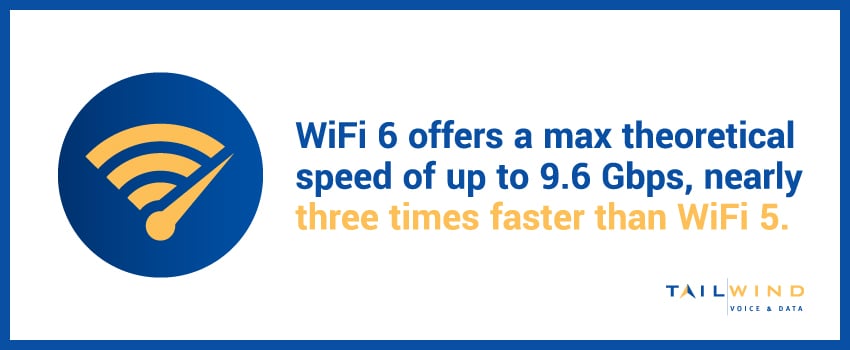
- Max theoretical speed of up to 9.6 Gbps, nearly three times faster than WiFi 5
- Supports 2.4 GHz and 5 GHz bands, offering improved range and flexibility
- Uses orthogonal frequency division multiple access (OFDMA) for more efficient data delivery
- Enhances MU-MIMO, allowing more devices to transmit simultaneously
- Performs better in dense environments with high device usage
At TailWind, we usually recommend WiFi 6 for clients who need faster speeds and better performance in multi-device environments, such as restaurants, healthcare facilities, schools, and large office campuses.
WiFi 5 vs WiFi 6: Compared
Let’s explore the difference between WiFi 5 and 6 in more detail across four main categories:
1. Multi-Device Efficiency
WiFi 6 was built for multi-device environments. Technologies like OFDMA and improved MU-MIMO make it easier for dozens of users to connect at once without slowing the network down. WiFi 5 can struggle in these conditions, especially in office buildings or large facilities where employees and guests share bandwidth.
2. Speed
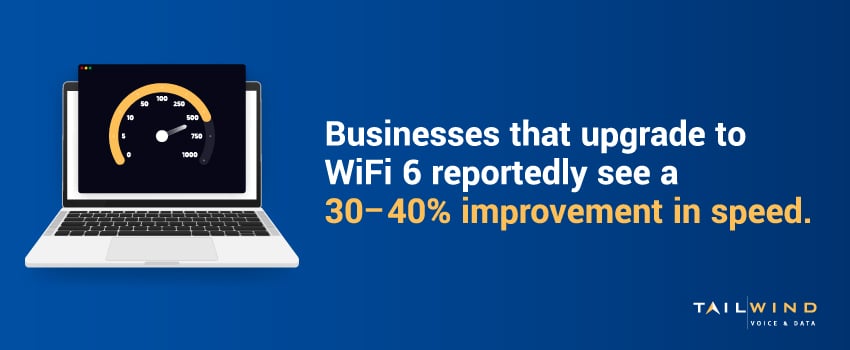
WiFi 5 reaches speeds up to 3.5 Gbps, while WiFi 6 can reach up to 9.6 Gbps. Real-world results will depend on equipment and environment, but businesses that upgrade to WiFi 6 tend to see a 30–40% improvement in speed.1 Faster speeds help with video conferencing, file transfers, and cloud apps that require reliable bandwidth.
3. Compatibility
WiFi 5 uses only the 5 GHz band, which offers high speed but a shorter reach. WiFi 6 operates on both 2.4 GHz and 5 GHz, combining better range with strong throughput and making WiFi 6 more adaptable across different spaces.
4. Security
WiFi 6 devices typically support WPA3, the newest and most secure WiFi encryption standard. WPA3 protects against common threats like password guessing and unauthorized access, which makes it a handy upgrade from the WPA2 standard used by WiFi 5 networks.
WiFi 6 Range vs WiFi 5 Range
Both standards use 5 GHz, but WiFi 6 has the advantage here because it also uses 2.4 GHz. The 2.4 GHz band travels farther and penetrates walls more effectively, while the 5 GHz band handles faster speeds at shorter distances. Together, they give WiFi 6 more reliability than WiFi 5.
WiFi 6 also helps reduce dead zones and provides a more consistent connection across larger environments. Plus, TailWind can help businesses evaluate and optimize wireless access points (WAPs) to take full advantage of WiFi 6’s full range and performance.
What Are The Different WiFi Types?
Still not sure where WiFi 5 and WiFi 6 fit within the larger picture? Here’s a quick overview of the generations in use today:
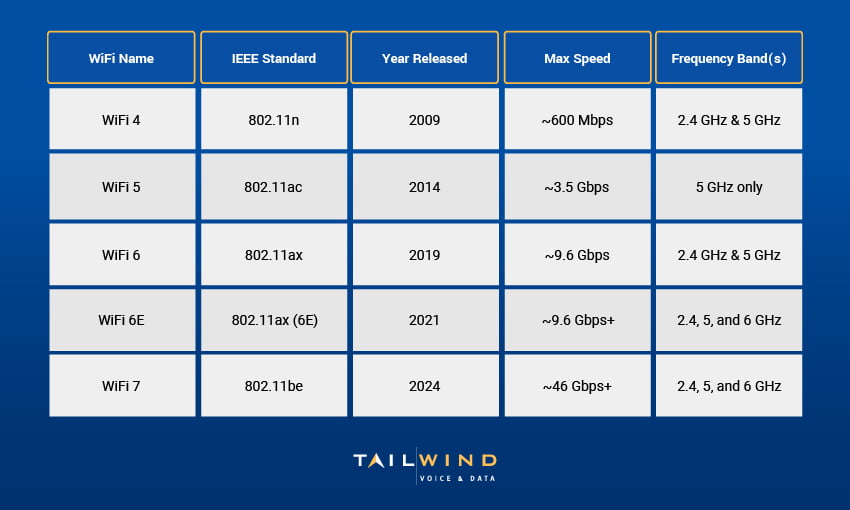
While WiFi 7 debuted in 2024 and is beginning to roll out commercially, WiFi 6 is still the best option for most businesses.
Should You Upgrade From WiFi 5 To WiFi 6?
If you're still running on WiFi 5, it’s time to consider whether your setup can keep up with your organization’s growth goals. You might need to upgrade if your teams are:
- Adding a growing number of connected devices
- Using video conferencing or cloud-based tools frequently
- Dealing with security concerns related to older encryption standards
- Experiencing ongoing connectivity issues or coverage gaps
Upgrading to WiFi 6 isn’t just about faster speeds. It creates a more reliable experience for your team and customers and helps future-proof your network for the years ahead.

WiFi 5 vs WiFi 6 FAQs
Is WiFi 6 Faster Than WiFi 5?
Yes. WiFi 6 offers a maximum theoretical speed of up to 9.6 Gbps, compared to around 3.5 Gbps for WiFi 5, and businesses that upgrade often see meaningful real-world speed improvements.
Does WiFi 6 Have Better Range Than WiFi 5?
In many environments, yes. WiFi 6 supports both 2.4 GHz and 5 GHz, which gives it better flexibility, stronger wall penetration, and more consistent coverage than WiFi 5, which operates only on 5 GHz.
Is WiFi 6 Better For Offices With A Lot Of Connected Devices?
Yes. WiFi 6 was designed for dense, multi-device environments, using technologies like OFDMA and enhanced MU-MIMO to help more users stay connected without slowing the network down.
Is WiFi 6 More Secure Than WiFi 5?
It typically is. WiFi 6 devices generally support WPA3, which offers stronger protection against common threats like password guessing and unauthorized access than the WPA2 standard commonly associated with WiFi 5 networks.
Do You Need New Hardware To Upgrade To WiFi 6?
In most cases, yes. To take full advantage of WiFi 6, businesses usually need WiFi 6-compatible access points and client devices that support the standard. This is why planning the upgrade around your environment and equipment matters.
When Should A Business Upgrade From WiFi 5 To WiFi 6?
It is usually time to consider an upgrade when your team is adding more connected devices, relying heavily on video conferencing or cloud applications, dealing with security concerns, or running into ongoing coverage and connectivity issues.
Is WiFi 6 Worth It If WiFi 5 Still Works?
For some smaller or lighter-use environments, WiFi 5 may still be enough. But for growing organizations, WiFi 6 can deliver better performance, stronger reliability, and a more future-ready network as demands continue to increase.
How Can TailWind Help With A WiFi 6 Upgrade?
TailWind supports WiFi upgrades with site surveys, wireless access point optimization, structured cabling, network engineering support, and project management for multi-location deployments.
Let TailWind Simplify Your Upgrade To WiFi 6
Wireless technology keeps evolving, but that doesn’t mean upgrading has to be complicated. Whether you’re opening new locations or upgrading legacy infrastructure, TailWind provides the hands-on expertise and national reach to get it done right.
We help enterprises deploy wireless networks that deliver secure, high-performance coverage with site surveys to optimize access point placement, structured cabling and network engineering support, and project management for multi-location deployments.
Ready to explore the difference between WiFi 5 and 6 at your business? Talk to TailWind today, and let’s design a wireless solution that supports your goals.
Sources: