TL;DR
-
WiFi 7 builds on WiFi 6 with faster speeds, wider 320 MHz channels, Multi-Link Operation, and better support for low-latency, high-density environments.
-
Real-world WiFi 7 performance depends on more than the standard itself, including client device support, signal quality, available spectrum, and overall network design.
-
Businesses will get the most value from WiFi 7 when their wired infrastructure, wireless clients, and 6 GHz strategy are ready to support it.
-
Whether you stay with WiFi 6 or prepare for WiFi 7, a wireless site survey helps ensure stronger coverage, better performance, and smarter infrastructure planning.
The demands on wireless networks are growing fast. With IoT connections expected to reach 20.1 billion this year1 and global data creation projected to hit 394 zettabytes by 2028,2 it’s more important than ever for network infrastructure to keep pace with digital transformation trends.
That’s where WiFi 7 comes in. WiFi 7 represents the next wireless evolution, with analysts predicting it will comprise 10% of all WiFi access points shipped in 2025.3 But before making a move to this exciting new technology, it’s important to understand the difference between WiFi 6 and WiFi 7 – and if an upgrade is the right choice for your enterprise.
In this guide, we’ll break down WiFi 6 vs WiFi 7 and explore the benefits of each to help you prepare for the shift.

What Is WiFi 7?
WiFi 7, or IEEE 802.11be, is the next-generation wireless standard designed to improve network performance over previous WiFi versions. While WiFi 6 (802.11ax) focused on boosting efficiency in high-density environments, WiFi 7 takes those improvements further by supporting faster speeds and more simultaneous connections – all with better spectrum utilization.
Some key features of WiFi 7 are:
- Max theoretical speed of up to 46 Gbps, compared to 9.6 Gbps with WiFi 6.
- Wider channel bandwidth of 320 MHz vs. WiFi 6, which only supports up to 160 MHz.
- 16x16 MU-MIMO support, up from 8x8 in WiFi 6.
- Multi-Link Operation (MLO) so that devices can send data across multiple bands at once.
- Improved efficiency and reduced latency for real-time applications like VR and 4K/8K streaming.
These enhancements position WiFi 7 as a future-ready solution for businesses looking to support increasingly connected environments.
WiFi 6 vs WiFi 7 Comparison
So, what exactly is the main difference between WiFi 6 and 7? Check out our comparison chart below to see how they stack up:
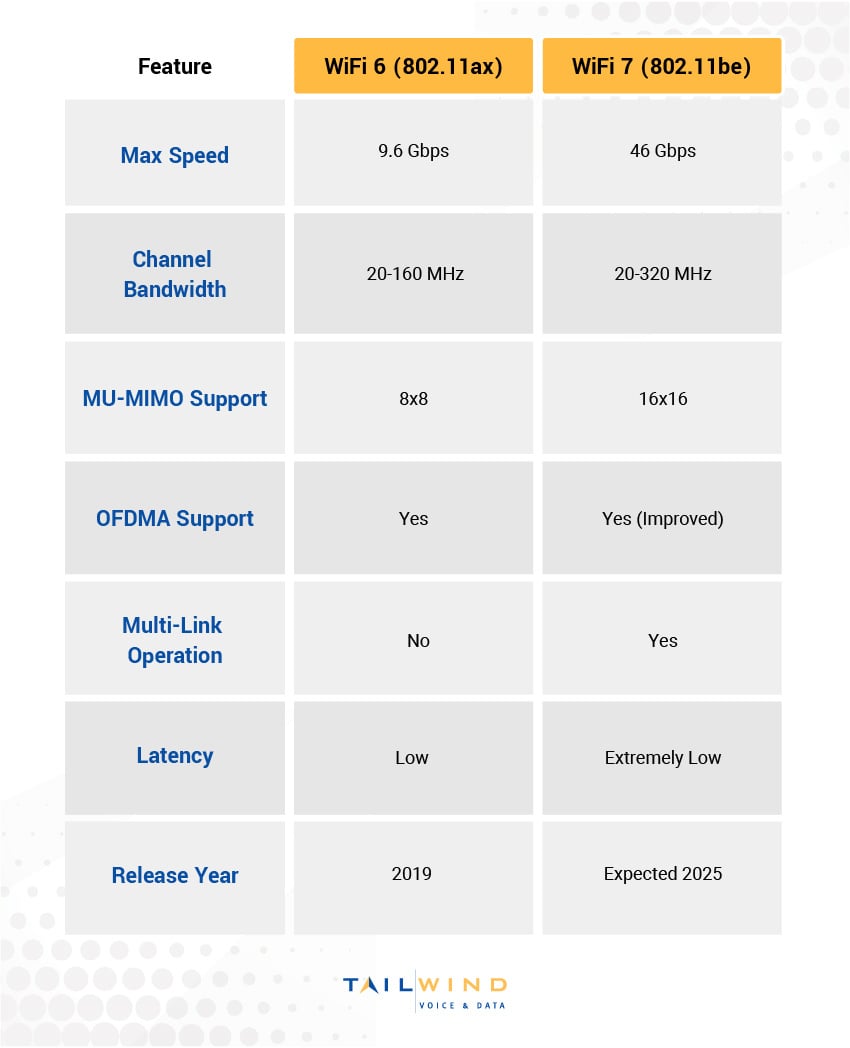
Overall, WiFi 7 introduces major improvements in speed, channel flexibility, and simultaneous data transmission. For environments with a lot of network-connected devices or real-time apps, these changes can make a huge difference in performance.
What Real-World WiFi 7 Performance Depends On
Client Device Compatibility
WiFi 7 brings meaningful improvements on paper, but real-world performance depends on more than the standard itself. One of the biggest factors is client support. To take advantage of advanced WiFi 7 capabilities like Multi-Link Operation (MLO), 320 MHz channels, and 4K QAM, both the access point and the connected device need to support those features.
In mixed environments where many endpoints still use older wireless radios, the network can still improve overall efficiency, but not every device will benefit equally. That means a business may upgrade its wireless infrastructure and still see uneven results across different users and device types.
Signal Quality & Coverage Conditions
Signal conditions also play a major role in WiFi 7 performance. Higher-order modulation like 4K QAM can move more data in the same transmission, but it works best when signal quality is strong. Likewise, wider 320 MHz channels can deliver much higher throughput, but only when enough clean spectrum is available to support them reliably.
This is why coverage planning and interference management still matter so much. Even with the latest wireless standard in place, poor signal quality, neighboring network interference, or weak access point placement can limit the benefits users actually experience.
Spectrum Availability & Network Design
Another important factor is how much usable spectrum is available in the environment. WiFi 7 is designed to make better use of available wireless resources, but the gains depend heavily on channel availability, RF planning, and the conditions of the deployment itself.
For businesses, the takeaway is simple: WiFi 7 can deliver impressive results, but those results depend on the quality of the overall deployment. Organizations that pair newer access points with capable client devices, well-planned coverage, and the right spectrum strategy are the ones most likely to see the full value of the upgrade.
Key WiFi 7 vs WiFi 6 Benefits
Choosing between WiFi 6 and WiFi 7 will depend on your current business needs and plans for the future. Here's a closer look at the benefits of WiFi 7 vs WiFi 6:
Increased Speed & Bandwidth
WiFi 7’s support for 320 MHz channels and 4K QAM modulation means it can transmit more data at faster rates. This makes it ideal for:
- High-definition video conferencing
- Augmented/virtual reality applications
- Large file transfers or backups
- Crowded device environments like corporate campuses
WiFi 7 lets users experience consistently better network performance, even during peak usage times, resulting in vastly improved team efficiency and productivity.
Improved Network Efficiency
With Multi-Link Operation (MLO), WiFi 7 devices can transmit and receive data across multiple bands (2.4GHz, 5GHz, and 6GHz) at once. This reduces latency for time-sensitive apps like video calls, which means users can experience fewer delays and more responsive connections.
WiFi 7 also offers better network load balancing. It intelligently distributes traffic across available frequency bands to prevent any single band from becoming congested, creating a more stable environment for mission-critical applications.

Enhanced Support For Time-Sensitive Applications
WiFi 7 offers more consistent low-latency performance for organizations that rely on time-sensitive applications – think real-time voice, video, or interactive tools. This is essential for:
- Unified Communications (UCaaS): WiFi 7 provides clearer voice quality and synchronized video so teams can collaborate without the frustration of audio delays or video freezes that hamper productivity and create meeting fatigue.
- Video Surveillance: WiFi 7’s increased bandwidth and reduced latency support higher-resolution cameras and more consistent streaming, improving security and monitoring capabilities.
- Point-of-Sale Systems: The reduced latency and stronger reliability offered by WiFi 7 ensure payment processing happens instantly and minimizes transaction failures, creating a smoother experience for customers and staff.
Better Performance In Congested Environments
While WiFi 6 introduced technologies like OFDMA and MU-MIMO to allow multiple users to share channels, WiFi 7 expands these capabilities. These enhancements provide better support for dense deployments where hundreds or thousands of devices need simultaneous access, so enterprises with high device concentrations will notice substantially improved performance.

Main WiFi 6 vs WiFi 7 Differences
From a business perspective, the difference between WiFi 6 and WiFi 7 isn’t just about speed; it’s about readiness.
WiFi 6 Is Ideal If:
- You recently upgraded your wireless infrastructure.
- Your environment has moderate to high device density.
- You need reliable performance but don’t yet require extreme throughput.
WiFi 7 May Be Better If:
- You’re designing a new wireless network with future growth in mind.
- You plan to support AR/VR, 8K video, or high-volume data traffic.
- Your users demand high-speed, low-latency access at all times.
- You're building a wireless-first or hybrid network strategy.
Both options are improvements over older WiFi standards, so make sure to align your choice with your business's specific needs rather than simply chase the latest technology.
What You Need Before You Upgrade To WiFi 7
Moving to WiFi 7 is not just about replacing access points. To get the full benefit, businesses need to look at the broader network environment and make sure the rest of the infrastructure can keep up.
Client Device Compatibility
The first requirement is compatible endpoints. Laptops, phones, tablets, collaboration devices, and other wireless clients need WiFi 7 support to take full advantage of features like MLO, 320 MHz channels, and 4K QAM. If most of your installed device base still uses WiFi 6 or older standards, you may still improve coverage and capacity with new access points, but the most advanced WiFi 7 gains will be limited until more client devices are refreshed.
Wired Network Capacity
Wireless upgrades also put more pressure on the wired side of the network. Higher-performing access points may require multi-gig switching, sufficient uplink capacity, and the right PoE support depending on the hardware you deploy. If the LAN, switching layer, or internet connection becomes the bottleneck, the wireless upgrade will not deliver the experience users expect.
Spectrum Planning & Channel Availability
WiFi 7 is designed to make better use of available spectrum, but that only helps if the RF environment is planned correctly. Channel width decisions, interference sources, neighboring networks, and the practical usability of 6 GHz all affect performance. Features like preamble puncturing can improve channel efficiency by allowing devices to avoid only the interfered portion of a wider channel instead of discarding the entire channel, but careful RF planning is still essential.
Coverage Design For Business Applications
Not every organization needs the same WiFi 7 design. A warehouse, office, school, healthcare site, and high-density campus will all have different coverage patterns, roaming demands, and application requirements. Businesses that rely on voice, video, mobile workflows, or dense device environments need to plan around the applications that matter most, not just the fastest possible speed test.
That is why a phased approach often makes the most sense. By evaluating client readiness, LAN capacity, RF conditions, and application priorities first, businesses can make smarter upgrade decisions and avoid investing in wireless performance that the rest of the environment is not yet ready to support.
Why 6 GHz Availability Matters In WiFi 7 Deployments
The Widest WiFi 7 Channels Depend On 6 GHz
One of the most important things to understand about WiFi 7 is that its 320 MHz channels are tied to the 6 GHz band. That matters because 320 MHz bandwidth is one of the biggest reasons WiFi 7 can support such high throughput. Without access to clean 6 GHz spectrum, businesses may still see benefits from WiFi 7, but they are less likely to realize the standard’s highest-performance potential.
6 GHz Can Create A Cleaner Wireless Environment
The 6 GHz band offers a large amount of newer spectrum with less legacy-device interference than 2.4 GHz and 5 GHz. That can make it especially valuable in dense business environments where congestion is already affecting performance. Because only newer WiFi 6E and WiFi 7 devices can use 6 GHz, organizations can often create a cleaner, more efficient experience for supported clients.
Range & Design Still Matter
At the same time, 6 GHz is not a universal shortcut to better coverage. Higher-frequency bands generally do not travel as far or penetrate obstacles as effectively as lower-frequency bands, so businesses need to account for layout, materials, user density, and access point placement. This is one reason wireless site surveys remain so important when planning for WiFi 7. The technology creates more opportunity, but design is what turns that opportunity into real performance.
Wireless Site Surveys: The Key To A Successful WiFi Deployment
Whether you're installing WiFi 6 today or planning a future upgrade to WiFi 7, a WiFi survey is essential for success.
A wireless site survey ensures:
- Correct access point placement for maximum coverage
- Minimal interference and channel overlap
- Right-sizing your AP investment based on usage needs
- Planning for aesthetics, mounting options, and bandwidth demand
Site surveys help businesses build more efficient wireless networks – without the guesswork. Organizations that skip this step tend to face issues like coverage gaps, performance issues, and unnecessary hardware costs.

5 Steps To Upgrade From WiFi 6 To WiFi 7
You don’t need to rip and replace your infrastructure to prepare for WiFi 7. In most cases, businesses can take an incremental approach.
Evaluate Your Existing Infrastructure
Start by reviewing your current access points and cabling to see whether they can support future upgrades. This gives you a clearer picture of what can stay in place, what may need improvement, and where your biggest limitations are today.
Use WiFi Surveys To Identify Performance Gaps
A WiFi survey can help uncover coverage issues, interference, and other performance problems that may already be affecting the user experience. Understanding those gaps now makes it easier to plan for a smoother transition later.
Prioritize High-Traffic Areas First
Rather than upgrading everything at once, focus first on the parts of your environment with the highest demand or the most noticeable performance issues. Pilot deployments in these areas can help you test the value of WiFi 7 before expanding further.
Choose Access Points With A Clear Upgrade Path
When investing in new hardware, look for access points that support WiFi 6E today and are aligned with your future WiFi 7 plans. That approach can help you improve performance now while reducing the need for unnecessary reinvestment later.
Build For Long-Term Scalability
As wireless demands continue to grow, your network should be designed to support multi-band connectivity, higher device density, and greater bandwidth needs over time. Planning with scalability in mind can help your business reduce future disruption and make smarter infrastructure decisions.
WiFi 6 vs WiFi 7 FAQs
Is WiFi 7 Really That Much Better Than WiFi 6?
WiFi 7 can deliver major improvements in speed, latency, and efficiency, especially in high-density environments or networks supporting real-time applications. That said, the actual difference will depend on your devices, available spectrum, and overall network design.
Is WiFi 7 Worth Upgrading To For Most Businesses?
It depends on your environment. If your organization is planning for growth, supporting more connected devices, or relying on bandwidth-intensive and latency-sensitive applications, WiFi 7 may be a smart long-term investment. If your current WiFi 6 network is relatively new and meeting your needs, a full upgrade may not be urgent yet.
Can WiFi 7 Improve Performance Even If My Devices Are Not All WiFi 7-Ready?
Yes, but the benefits will vary. Upgrading access points can still improve capacity and overall network efficiency, but devices that do not support WiFi 7 features will not be able to take full advantage of capabilities like MLO or 320 MHz channels.
Do You Need 6 GHz To Benefit From WiFi 7?
Not entirely, but 6 GHz plays a major role in unlocking WiFi 7’s highest-performance capabilities. In particular, 320 MHz channels rely on 6 GHz availability, so the biggest throughput gains are most likely in environments where that band can be used effectively.
Is WiFi 7 Only Useful For Very Large Enterprises?
No. Large enterprises may see some of the biggest benefits, but smaller organizations can benefit too, especially if they rely on cloud collaboration, video-heavy workflows, or dense wireless usage. The right choice depends more on application needs and growth plans than company size alone.
Will WiFi 7 Fix Poor Wireless Performance On Its Own?
Not necessarily. If the underlying issue is poor access point placement, interference, weak coverage, or wired-network bottlenecks, simply upgrading the wireless standard may not solve the problem. A proper site survey and network assessment are still critical.
What Infrastructure Should Businesses Check Before Moving To WiFi 7?
Businesses should review client device compatibility, access point readiness, switching and uplink capacity, available PoE, internet bandwidth, and overall RF conditions. A WiFi 7 deployment is most successful when the entire network environment is considered, not just the wireless hardware.
Is WiFi 6 Still A Good Choice For Businesses?
Absolutely. WiFi 6 remains a strong option for many organizations and still offers excellent performance, efficiency, and support for high-density use cases. For businesses that upgraded recently or do not yet need the latest capabilities, WiFi 6 may continue to be the right fit.
How TailWind Helps Optimize Your WiFi Network
Choosing between WiFi 6 vs WiFi 7 is more than a spec sheet comparison – it’s a strategic decision. That’s why the TailWind team takes the time to understand your wireless environment, business needs, and future goals before making a recommendation.
Trust Tailwind for:
- WiFi site surveys backed by Ekahau-certified engineers
- Consultation on AP selection, placement, and coverage
- Installation and optimization of WiFi 6 and WiFi 7-ready networks
- Ongoing support through Field Services and NOCaaS
If you're evaluating your next wireless move or just want to ensure your current WiFi is performing at its best, we’re here to help. Contact us today to get started with a custom WiFi strategy built around your business.
Sources: