Splicing coax cable is an important skill for anyone working with commercial cabling infrastructure. When done correctly, a proper coaxial splice is virtually transparent to the signal passing through it. Done incorrectly, however, and it becomes a source of signal loss, interference ingress, and intermittent faults that are frustrating to diagnose.
In this guide, we’ll cover everything you need to know about how splicing works, what tools and hardware to use, and when it makes more sense to pull a new run instead.
What Does It Mean to Splice Coax Cable?
A coax cable splice joins two separate lengths of coaxial cable so that the combined run functions as a single continuous cable. Unlike other cable types where splicing might mean twisting conductors together, a coaxial splice has to preserve the cable's layered construction – which includes a center conductor, dielectric insulator, metallic shield, and outer jacket – while also maintaining the cable's impedance (typically 75 ohm for video/broadband or 50 ohm for RF/antenna applications).
In commercial environments, coax splicing most commonly comes up in the context of security camera systems, cable TV or broadband distribution, and in-building antenna infrastructure. For applications where signal integrity is critical, such as DAS backbone runs or RF systems, the splice method and hardware matter considerably.
TailWind’s structured cabling team works with coax infrastructure across all of these applications, and the standard we hold every splice to is the same: the splice should be indistinguishable from the cable itself in terms of signal performance.
Coax Cable Splicer Options: Choosing the Right Hardware
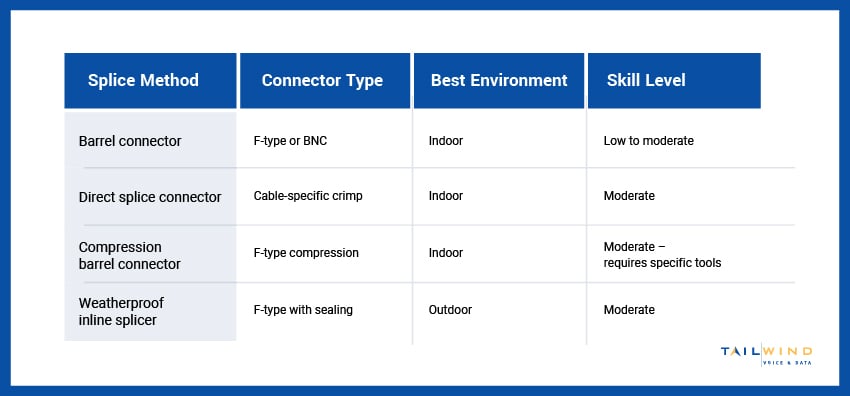
The hardware you use to splice coax cable determines the quality of the result. There are three main approaches used in professional commercial installations:
Barrel Connector (Inline Coaxial Cable Splicer)
A barrel connector – also called an inline coax splicer or coaxial splice adapter – is the most common method for joining two coax runs. It consists of two female coaxial ports (F-type or BNC) connected back-to-back in a single housing. Each cable end is terminated with its own connector, and the two connectors thread into the barrel.
- Best for: Indoor repairs, permanent extensions, distribution systems
- Signal loss: Minimal when quality connectors and a quality barrel are used – typically less than 0.5 dB
Make sure to use compression connectors rather than crimp or push-on types for permanent installations. It’s also important to keep in mind that any barrel connectors used outdoors must be weatherproofed.
Coaxial Splice Connector (Direct Crimp or Compression Splice)
Some manufacturers produce dedicated in-line coax splicer connectors designed to join two cable ends without the need for two separate connectors and a barrel. These direct splice connectors grip and terminate both cable ends in a single housing using a crimp or compression tool.
- Best for: Situations where a lower-profile splice point is preferred, or where barrel connectors aren’t practical
- Signal loss: Comparable to the barrel connector method when installed correctly
This method requires the correct splice connector sized for your specific cable type, which is not universally interchangeable between RG-6, RG-11, and LMR cable families.
Coax Splicer for Outdoor and Weatherproof Applications
For outdoor runs or any splice point exposed to moisture, a standard indoor barrel connector isn’t sufficient. Outdoor-rated coax splicers use weatherproof housings, dielectric grease, and UV-resistant materials to protect the connection from water ingress, which is the primary cause of outdoor coax splice failure.
If you’re stuck on which splice method to use for your environment, here’s a quick reference guide:
Tools Required for Coax Cable Splicing
Before you can splice coax cable properly, you need the right tools:
- Coax Cable Stripper: Use a rotary coax stripper calibrated for your cable type (RG-6, RG-11, LMR-400, etc.) for precise, consistent strip lengths.
- Compression Tool: Seating a compression-type F connector requires a calibrated compression tool. Hand pressure alone won’t create a watertight, mechanically secure connection.
- Coax Cable Cutter: A rotary coax cutter creates a clean, perpendicular end without deforming the cable's round cross-section.
- Signal Level Meter or Coax Tester: Verify every splice with a meter after installation. Testing confirms the splice hasn't introduced unacceptable signal loss before the system is put back into service.
- Torque Wrench: For RF applications with N-type connectors, a torque wrench ensures the connector is seated to the manufacturer's specification without over-tightening.
Using the wrong tools is the most common source of poor splice quality in DIY and undertrained installations. For example, using a utility knife instead of a rotary stripper will create inconsistent strip lengths, leaving either exposed dielectric that won't seat properly in the connector or too much jacket that prevents a tight connection.
How to Splice Coax Cable: Step-by-Step
Let’s break down how to splice a coax cable using the barrel connector method – the most widely applicable approach for commercial coax splicing.
Step 1: Cut and Prepare Both Cable Ends
If you're repairing a damaged run, cut cleanly through the damaged section, removing it entirely. Use a rotary coax cutter to create a clean, perpendicular cut on both cable ends you'll be joining. Avoid angled cuts, as they complicate connector seating, potentially reducing the reliability of your finished splice.
Step 2: Strip the Cable
Strip both ends of the cable using a rotary coax stripper calibrated for your cable type. A standard RG-6 compression F-connector typically requires approximately 5/8" of the outer jacket and 1/4" of the dielectric to be removed, leaving the center conductor exposed. Follow the specific dimensions for your connector, which should be printed on the connector packaging or available in the manufacturer's installation guide.
After stripping, fold the braided shield back over the outer jacket evenly. Ensure no braid strands are touching the center conductor, as a short between the center conductor and the shield will prevent the system from working entirely.
Step 3: Attach Connectors to Both Ends
Slide the compression sleeve onto the cable first, then insert the connector body. The center conductor should extend through the pin, and the dielectric should be flush with or slightly recessed inside the connector body.
Using the compression tool, compress the connector onto the cable in a single smooth stroke. The connector should be visibly locked – the sleeve cannot be pulled back off by hand. Inspect the center conductor pin; it should protrude cleanly from the connector face with no deformation.
Step 4: Connect Both Ends to the Coaxial Splice Connector / Barrel
Thread or insert each terminated cable end into the inline coaxial cable splicer or barrel connector.
For F-type threaded barrels, hand-tighten firmly – do not use pliers on the connector, only on the barrel's hex body if additional torque is needed.
For weatherproof outdoor applications, apply a thin layer of dielectric grease to the threaded connection before assembling it, then seal the completed barrel with self-amalgamating tape.
Step 5: Test the Splice
Reconnect the cable run and test with a signal level meter at the downstream endpoint, then compare the reading to what you'd expect for the combined cable run length. A properly executed splice should add no more than 0.5 dB of insertion loss above the cable's calculated attenuation for the run length.
If the reading is lower than expected, the splice connection (or one of the connectors) should be inspected and redone.
Coax Splicing vs. Running a New Cable: How To Decide
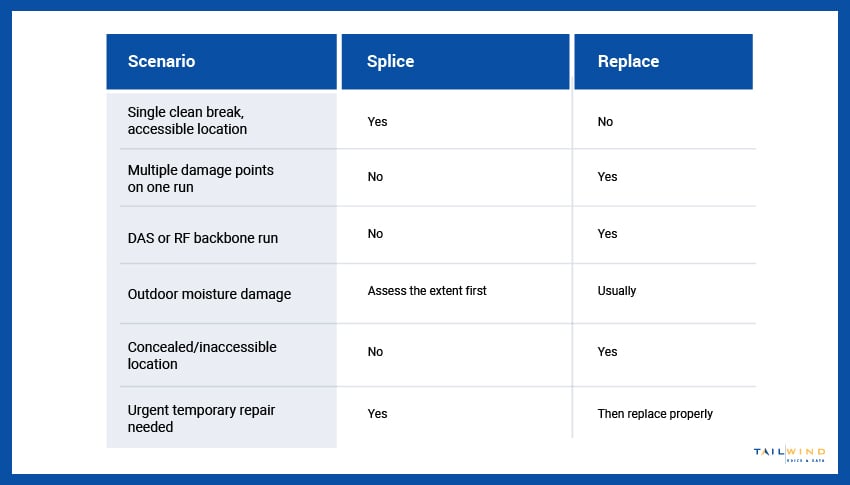
Splicing coax cable is the right solution in specific situations, but not all of them. Here's when you should pull a new run instead:
- Multiple Splice Points on a Single Run: Each splice introduces a small amount of signal loss and a potential failure point. One splice on a run is generally acceptable. Two or more on a single continuous run is a sign that the cable should simply be replaced.
- DAS or High-Frequency RF Applications: For LMR-400 or LMR-600 DAS backbone runs where signal loss budgets are tight, even a well-executed splice may consume too much of the allowable loss margin. In most DAS designs, splicing the backbone runs is specifically excluded.
- Outdoor Runs With Unknown Damage: If a cable has been exposed to moisture ingress, the damage may extend beyond its visible break point. Splicing without replacing the affected section can leave latent degradation in the line.
- Code-Compliance Contexts: Some building codes and commercial installation standards specify that splices must be accessible – not concealed inside walls or above non-accessible ceiling spaces. If a splice will be inaccessible after installation, a new continuous run is the compliant approach.
Still lost? Here are some common cabling issues and when you might need to splice or replace:
If you’re not sure whether a damaged coax run should be spliced or replaced, TailWind’s field services team can assess the situation and recommend the right fix. We work with coax infrastructure across commercial deployments of all sizes, from single-site repairs to standardized cabling projects across nationwide rollouts.
Need Help With Your Coax Infrastructure?
A properly executed coaxial splice is a reliable, long-lasting repair when it's the right tool for the situation. But commercial coax infrastructure deserves the same professional approach as any other cabling system – the right hardware, the right technique, and verification that the finished work actually performs.
Troubleshooting a damaged run, planning a coax infrastructure project, or managing cabling across multiple locations? TailWind can help. Get in touch with our cabling experts today, and let's make sure your coax infrastructure meets a standard you can count on.