TL;DR
-
Managed IT means outsourcing ongoing IT support, monitoring, and maintenance to a specialized provider.
-
It helps businesses improve reliability, security, and day-to-day operational efficiency.
-
Services can include help desk support, network monitoring, cybersecurity, cloud support, and IT strategy.
-
The right managed IT model depends on your internal resources, business goals, and support needs.
IT touches every part of how a business operates, but not every organization has the resources to manage it all on its own. Managed IT services offer a way to share that responsibility with experts who can monitor, support, and maintain systems day to day.
The approach is gaining momentum, with experts predicting that the global managed IT services market will reach $511 billion by 2029.1 Read on to learn exactly what managed IT support is, the types of services available, and how to decide if working with a managed services provider like TailWind is right for your business.
What Is Managed IT?
Managed IT refers to outsourcing some or all of your IT operations to a third-party provider, often called a managed services provider (MSP). Instead of building an in-house team to handle every technical need, you work with a partner that monitors, maintains, supports, and improves your systems on an ongoing basis.
The goal is not just to fix problems when they happen. It is to proactively keep your technology secure, stable, and aligned with how your business operates. For organizations with multiple locations, lean internal teams, or growing infrastructure needs, managed IT can make day-to-day technology management more predictable and easier to scale.
Key Components & Services Of Managed IT
Managed IT can cover a wide range of responsibilities depending on the provider and your environment. While the exact scope varies, most managed IT programs include a core set of services designed to keep systems running smoothly and reduce operational risk.
Network Monitoring & Maintenance
A managed IT provider typically monitors your network around the clock to detect performance issues, outages, and unusual activity before they become larger problems. This often includes device monitoring, patching, troubleshooting, and routine maintenance to help keep your environment stable and available.
Help Desk & End-User Support
Managed IT often includes support for everyday technical issues affecting employees and end users. That can range from login problems and software errors to device setup and general troubleshooting. Having a dedicated support resource helps reduce downtime and gives your team a clear path to resolution when issues come up.
Server, Endpoint & Infrastructure Management
Infrastructure management usually covers the systems your business depends on behind the scenes, including servers, workstations, firewalls, switches, and other core technology assets. A provider helps maintain performance, apply updates, manage configurations, and reduce the likelihood of failures that can interrupt operations.
Cybersecurity Support
Security is one of the most important parts of managed IT. Providers may help protect your environment through services such as endpoint protection, firewall management, threat monitoring, access controls, patching, and security best practices. The goal is to reduce exposure to threats while improving your organization’s overall security posture.
Cloud & Hybrid IT Support
Many businesses operate across a mix of on-premises systems and cloud-based platforms. Managed IT providers can help support those environments by maintaining cloud applications, assisting with migrations, monitoring performance, and making sure systems work together reliably across locations and teams.
Backup, Business Continuity & Disaster Recovery
Technology issues are not always limited to small disruptions. Managed IT can also include backup oversight, recovery planning, and business continuity support to help your organization respond when systems go down or data becomes unavailable. These services are especially valuable for businesses that need to minimize downtime and restore operations quickly.
IT Strategy & Advisory Support
Managed IT is not only about maintenance and support. Many providers also help businesses make better long-term technology decisions. This can include planning upgrades, evaluating new solutions, improving IT budgeting, and aligning technical priorities with broader business goals.
Vendor Coordination
In many environments, IT depends on multiple outside vendors, such as internet providers, software providers, hardware vendors, and telecom partners. A managed IT provider can help coordinate with those vendors on your behalf, saving your team time and simplifying issue resolution when multiple systems or providers are involved.
How Do Managed IT Services Work?
When your business partners with an MSP, the provider takes on responsibility for agreed-upon tasks, such as monitoring your network, keeping systems patched, or providing end-user support. This is typically outlined in a Service Level Agreement (SLA), which defines responsibilities, performance metrics, and pricing.
For example, TailWind’s managed IT services include everything from day-to-day help desk requests to long-term IT planning. As an MSP, we work to proactively prevent technology problems by monitoring performance 24/7 and recommending improvements that align with your goals.
Most providers operate on a subscription model. You’ll pay a predictable monthly fee in exchange for the agreed-upon services, enabling easier IT budgeting while ensuring your technology is maintained and available when your teams need it.
Managed IT Pricing Models & How To Budget
Managed IT is usually delivered on a subscription basis, but the way pricing is structured can vary. Understanding the common models makes it easier to compare providers and plan your budget.
Per-User Pricing
With per-user pricing, you pay a set monthly fee for each person who needs support. This often includes all of that user’s devices, such as laptops, desktops, and mobile endpoints. It’s a good fit if your headcount is relatively stable and you want pricing that scales cleanly as your team grows.
Per-Device Pricing
Per-device pricing focuses on the hardware itself, for example, a monthly rate for each server, workstation, or network device. This approach can work well if you have a fixed number of critical systems and want clear visibility into the cost of supporting them.
Tiered & Bundled Plans
Many MSPs offer tiered plans that bundle services into “good, better, best” packages. As you move up the tiers, you typically gain more coverage, such as advanced security, broader hours of support, or additional consulting time. Tiered models make it easier to standardize support across locations and upgrade as your needs change.
A La Carte & Project-Based Services
Some organizations prefer to start with a smaller scope, such as managed security, backups, or a specific rollout. A la carte and project-based services let you target high-priority areas first, then expand into a broader managed IT program over time. This is common when a business wants to test the partnership before moving more responsibilities to the provider.
Budgeting For Managed IT
When you evaluate proposals, look beyond the monthly line item. Consider what’s included (such as 24/7 monitoring, onsite support, and strategic planning), how the provider handles new locations, and whether the agreement will still make sense as you grow. For many distributed enterprises, the biggest advantage is predictability, replacing sporadic break/fix costs with a consistent, proactive investment in uptime and performance.
Types Of Managed IT Services
Businesses have many different technology needs, which is why managed IT solutions are often tailored to fit your environment. Here are some of the most common categories of managed IT support:
Infrastructure Management
Infrastructure management covers the backbone of your technology environment, including servers, switches, routers, and firewalls. The provider keeps your hardware and virtual systems updated, monitored, and performing optimally to help you reduce downtime and avoid equipment failures.
Cyber Security Services
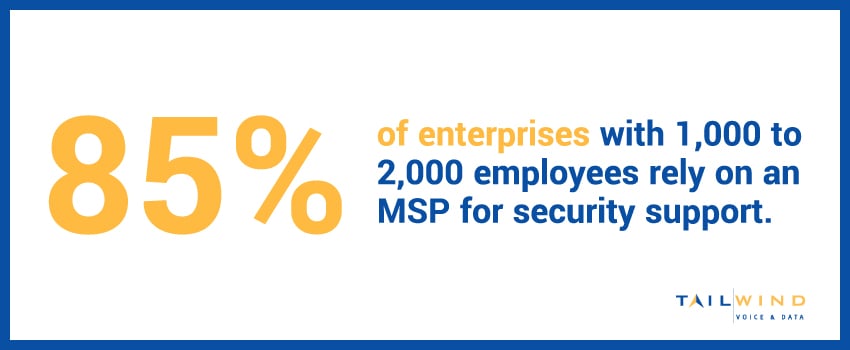
The majority (85%) of enterprises with 1,000 to 2,000 employees rely on a managed IT services provider for security support.2 MSPs deploy layered security measures like firewalls, endpoint detection, intrusion prevention, and data encryption to defend against emerging threats, plus they can help you maintain business continuity with disaster recovery and incident response planning.
Help Desk & End-User Support
Employees depend on fast support when technical issues arise. Managed help desk services give them a resource for resolving problems like login errors, software bugs, or device malfunctions, reducing frustration for end users.
Network Management
Managed network services typically include configuration, monitoring, optimization, and patch management. These services are meant to ensure that connectivity is secure, bandwidth is properly allocated, and problems are addressed before they can affect performance.
Cloud & Hybrid IT Support
Many modern businesses use a hybrid environment, where some workloads are on-premises and others live in the cloud. Managed IT providers can oversee cloud migrations, monitor cloud apps, and make sure integrations between your various platforms run smoothly.
IT Consulting & Strategy
Managed IT isn’t only about taking care of day-to-day operations. Some MSPs also offer advisory services to help your organization plan upgrades, optimize your tech budget, and align IT goals with business objectives.
Business Continuity & Disaster Recovery (BCDR)
Even a short outage can disrupt operations, especially when you’re supporting multiple locations. Business continuity and disaster recovery (BCDR) services focus on keeping your core systems available and getting them back online quickly after an incident.
An MSP can help you design and maintain backup policies, test recovery procedures, and create a clear plan for restoring critical applications if there’s a cyberattack, hardware failure, or natural disaster. For multi-site enterprises, this means every location knows how to respond, and your teams can get back to serving customers with minimal downtime.
On-Site & Field Support Services
Remote tools solve a lot of issues, but some work still has to happen on the ground. On-site and field support services cover tasks like new-site turn-ups, hardware swaps, cabling, and in-person troubleshooting when remote fixes aren’t enough.
For a provider like TailWind, that means sending qualified technicians to your locations across the country, following consistent processes and standards. Instead of coordinating multiple local vendors, you get a single partner who can provide hands-on support wherever you operate.
6 Benefits Of Managed IT Services
Choosing the right provider for managed IT support can offer measurable advantages for multi-site businesses, such as:
1. Seamless Scalability
IT needs grow quickly when a business expands to new locations or hires more staff. MSPs make it easy to scale support by adding new users, devices, or services without the tedious (and expensive) hiring process.
2. Lower, More Predictable Costs
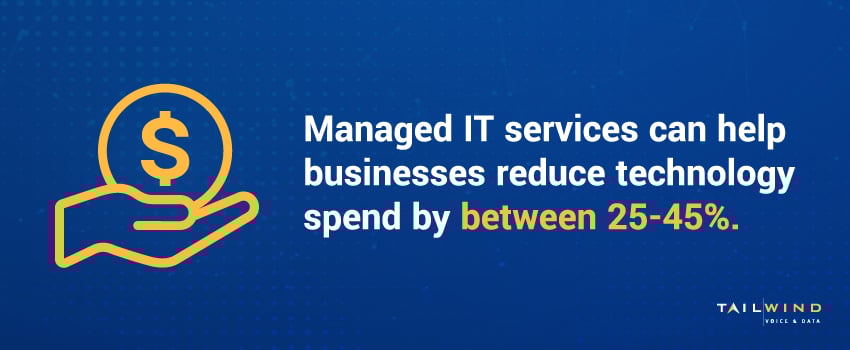
Managed IT typically operates on a fixed monthly fee, which makes budgeting easier. Businesses can avoid the unpredictability of break/fix billing and often save money – typically between 25-45%3 – compared to building a full in-house IT team.
3. 24/7 Monitoring & Faster Response
Technology doesn’t operate on a 9-to-5 schedule. Managed IT services, such as TailWind’s NOCaaS solutions, provide monitoring and support around the clock, helping to catch issues before they can escalate and reduce downtime.
4. Access To Expertise
Partnering with an MSP sets businesses up with a team of professionals who have experience across multiple technologies and industries. This range of knowledge can be tough to access in-house, especially for smaller teams.
5. Improved Security & Compliance
Managed IT support can strengthen your overall security posture and make it easier to meet compliance standards such as HIPAA, PCI-DSS, or SOC 2, reducing the risk of fines or breaches.
6. Freeing Up Your Internal Team
Offloading routine tech management to an MSP lets internal IT staff spend more time on projects that directly support the business, like digital transformation initiatives or app development.
Co-Managed IT: Partnering With Your In-House Team
Not every business wants to fully outsource IT. In many cases, the best approach is a partnership where your internal IT team and an MSP share the work. This is often called co-managed IT.
With a co-managed model, your in-house staff keeps ownership of day-to-day decisions and institutional knowledge, while a provider like TailWind adds extra capacity, specialized skills, and 24/7 monitoring. That way, routine tasks and after-hours alerts are handled consistently, and your team can stay focused on the projects that move your business forward.
When Co-Managed IT Makes Sense
Co-managed IT is a strong fit if your team:
-
Is spending more time “keeping the lights on” than driving new initiatives
-
Needs specialized expertise in areas like security, hybrid cloud, or multi-site networking
-
Wants 24/7 coverage without hiring additional full-time staff
Instead of replacing what you already have, a co-managed partner fills gaps, adds scale, and helps you maintain consistent support across all locations.
How Tailwind Supports Internal IT Teams
For distributed enterprises, TailWind can operate as an extension of your IT department. We handle tasks like monitoring, patching, vendor coordination, and nationwide on-site support, while your internal team stays close to end users and business leadership.
This shared-responsibility model gives you the best of both worlds: a familiar in-house team plus an experienced partner who can step in wherever you need extra hands or deeper expertise.
Common IT Managed Services Challenges
While managed IT solutions offer plenty of benefits, it’s important to understand their potential downsides:
Less Internal Control
Some businesses worry that outsourcing IT may reduce their level of control. The reality is that most providers work under clear contracts and give customers strategic oversight, while handling day-to-day execution.
Vendor Lock-In
Some MSPs use proprietary tools or offer inflexible contracts, so make sure to review agreements carefully before selecting a provider. At TailWind, we prioritize transparency and scalability, so you get options – not restrictions.
Upfront Transition Effort
Switching to a managed IT service can involve some work upfront, such as migrating systems and training staff. While the long-term ROI often outweighs the initial effort, don’t forget to plan for a transition period.
Why Choose Managed IT Services?
If your team is stretched thin, facing frequent downtime, or struggling to keep up with upgrades, IT managed services could be the way to go.
At Tailwind, we deliver IT managed services specifically designed for distributed enterprises – so whether you have five locations or 500, you get reliable, consistent support across the board. We offer:
- Nationwide on-site service
- Centralized management and reporting
- Scalable service models
- Proven experience with complex environments
Whether you're a retail chain, healthcare provider, financial firm, or multi-office enterprise, we act as an extension of your team to deliver consistent, hands-on support wherever you operate.
How To Choose The Right Managed IT Provider
Once you’ve decided that managed IT support makes sense for your business, the next step is choosing a provider who can support you long term.
Clarify Your Requirements
Start by documenting what you need help with today and where your internal team is stretched. Include the number of locations, typical support hours, key applications, and any compliance or security requirements. The more concrete you can be, the easier it is to evaluate whether a provider’s services match your environment.
Look For Multi-Site & Field Experience
If you operate multiple locations, you’ll want an MSP that’s already comfortable supporting distributed enterprises. Ask how they handle nationwide on-site work, new-location turn-ups, and coordination with local vendors. A provider like Tailwind, which is built around multi-site support, should be able to explain how they maintain consistency across hundreds of sites.
Review SLAs, Communication & Reporting
Your Service Level Agreement (SLA) should clearly outline response times, escalation paths, uptime targets, and what’s included in your monthly fee. It’s also important to understand how you’ll stay informed: regular reporting, a named point of contact, and clear communication channels all make it easier to keep IT aligned with your business goals.
Check Security & Compliance Capabilities
Security is a core part of managed IT, not an add-on. Make sure any provider you consider can support your regulatory needs – for example, HIPAA, PCI-DSS, or SOC 2 – and explain how they handle patching, endpoint protection, incident response, and user training. If they can’t clearly describe their security approach, that’s a red flag.
Consider Cultural Fit
Lastly, look at how the provider works with internal teams. The best MSPs act as an extension of your organization, collaborating with your staff instead of simply taking tickets. During the evaluation process, pay attention to how they listen, explain options, and respond to your questions – it’s often a preview of the working relationship you can expect.
Managed IT Services FAQs
What Is Included In Managed IT Services?
Managed IT services typically cover proactive monitoring, patching, and support for your core systems and users. That often includes network and infrastructure management, cybersecurity tooling, help desk support, backup and recovery, and ongoing guidance on upgrades and lifecycle planning. The exact scope depends on your agreement and the needs of your business.
What Is A Managed IT Service Provider?
A managed IT service provider (MSP) is a third party that takes on responsibility for part or all of your IT operations under a long-term agreement. Instead of calling for help only when something breaks, you partner with an MSP that continuously monitors your environment, resolves issues, and helps you plan ahead so technology supports your business strategy.
How Do I Choose A Managed IT Provider?
Start by mapping your requirements, then look for a provider with experience supporting organizations similar to yours in size, complexity, and industry. Review their SLAs, security practices, and reporting, and ask how they handle multi-site support, after-hours coverage, and co-managed arrangements with internal IT. References and case studies are useful for verifying that they can deliver on their promises.
How Much Do Managed IT Services Cost?
Pricing depends on factors like the number of users and locations, the systems in scope, security and compliance needs, and the level of support you require. Most providers use subscription models such as per-user, per-device, or tiered plans. The goal is predictable monthly costs that replace ad-hoc fixes with proactive support, often at a lower total cost than building the same capabilities in-house.
Why Use Managed IT Services?
Managed IT services help businesses stay ahead of issues, reduce downtime, and make better use of internal resources. By offloading monitoring, maintenance, and day-to-day support to an MSP, your team can focus on strategic projects while still knowing that your core systems, networks, and endpoints are being watched 24/7.
What Industries Rely Most On Managed IT Services?
Managed IT services are widely used across sectors where uptime, security, and compliance are critical, including healthcare, financial services, retail, manufacturing, and professional services. Any organization that depends on distributed locations, complex networks, or regulated data can benefit from partnering with an MSP that understands their environment.
What Is The Difference Between Managed IT And Break/Fix IT Support?
Managed IT is a proactive service model where a provider continuously monitors, maintains, and supports your technology environment for a predictable monthly fee. Break/fix IT support is reactive, meaning you typically call for help only after something goes wrong. For businesses with multiple locations or limited internal resources, managed IT often provides more stability, better visibility, and fewer unexpected disruptions.
What Is Co-Managed IT?
Co-managed IT is a flexible model where your internal IT team works alongside a managed services provider. Instead of replacing your in-house staff, the provider supports them by taking on specific responsibilities such as monitoring, help desk coverage, cybersecurity, or project support. This approach can work well for organizations that want to strengthen their IT capabilities without fully outsourcing everything.
Do Managed IT Services Include Cybersecurity?
Yes, many managed IT services include cybersecurity support as part of the overall service package. Depending on the provider, this can include services such as firewall management, endpoint protection, threat monitoring, patching, backup oversight, and support for business continuity and disaster recovery planning. The exact scope varies, so it is important to confirm what security responsibilities are included in the agreement.
Get Started With Tailwind’s Managed IT Services
IT demands are growing every day, but having the right support in place can help you stay confident that your enterprise systems are managed with care while taking the burden off your internal IT teams.
If you're ready to take the complexity out of managing your business technology, Tailwind can help. Our managed IT solutions combine technical expertise with on-the-ground service, so you don’t have to choose between responsiveness and scale. No matter your managed IT needs, our nationwide support teams become an extension of your IT department – so you can focus on your business.
Contact us today to learn how TailWind can support your business with hands-on, scalable managed IT services.
Sources: