Internet outages aren’t just inconvenient for businesses – they impact revenue, operations, and even customer trust. The cost of a few hours offline can be high, with more than 90% of midsize and large enterprises reporting that just one hour of downtime costs them more than $300,000.¹
Internet failover is what prevents single-point-of-failure outages from taking your business offline. Read on to learn what failover is, how it works, and what to look for in an internet failover service.
TL;DR
-
Internet failover automatically switches business traffic from a failed or degraded primary connection to a backup connection within seconds, so an outage doesn’t take phones, cloud apps, and payment systems offline.
-
Downtime is expensive, with more than 90% of midsize and large enterprises reporting that a single hour offline costs them over $300,000.
-
Cellular backup is the most practical failover option for most business locations, while a second wired ISP on a diverse network path provides the strongest redundancy for high-volume sites.
Backup Internet Failover Meaning: What Is Internet Failover?
Failover refers to the automatic switching of network traffic from a failed or degraded primary connection to a secondary backup connection. In an internet failover configuration, when your main internet circuit drops, or performance falls below acceptable thresholds, traffic is rerouted to a backup connection – ideally without users noticing the switch.
Why Does Backup Internet For Business Matter?
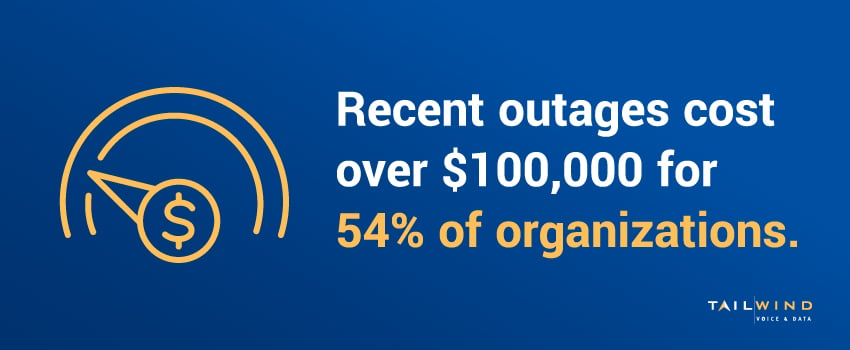
In a 2025 report from Uptime Institute, 54% of organizations said their most recent major outage cost over $100,000, and one in five said it cost more than $1 million.2
These costs are so high because for most businesses, downtime triggers cascading consequences beyond the immediate revenue impact, including:
Communication Breakdown
VoIP phones, video conferencing, and customer support systems all go dark, cutting you off from customers and partners simultaneously.
Stalled Operations
When cloud-based ERP, CRM, and productivity tools become inaccessible, you’re essentially paying employees to wait.
Customer Experience Damage
Repeated outages erode customer trust in ways that are hard to recover, particularly for service businesses where reliability is the product.
Compliance and Security Risk
In regulated industries, certain outages can trigger reporting obligations or compliance violations.
How Does Internet Failover Work?
Internet failover is delivered through a network device, typically a router or SD-WAN appliance, that monitors the primary connection and switches traffic to the backup when problems are detected. Here are the stages this process follows:
- Detection: The router watches for total connection loss, degraded performance (due to high latency and packet loss), or failed reachability tests against external targets.
- Switchover: When the router detects failure, it automatically reroutes traffic to the backup connection. Modern systems complete this in seconds – fast enough that most application sessions survive the transition.
- Monitoring: While on backup, the router continues monitoring the primary connection for restoration.
- Failback: Once the primary connection is stable again, traffic shifts back automatically.
When done correctly, failover turns what would have been a multi-hour outage into a transition that your users never register.
Backup Internet Connection Types: Comparing Your Options
Let’s look at the most popular internet backup options below:
Cellular Backup Internet
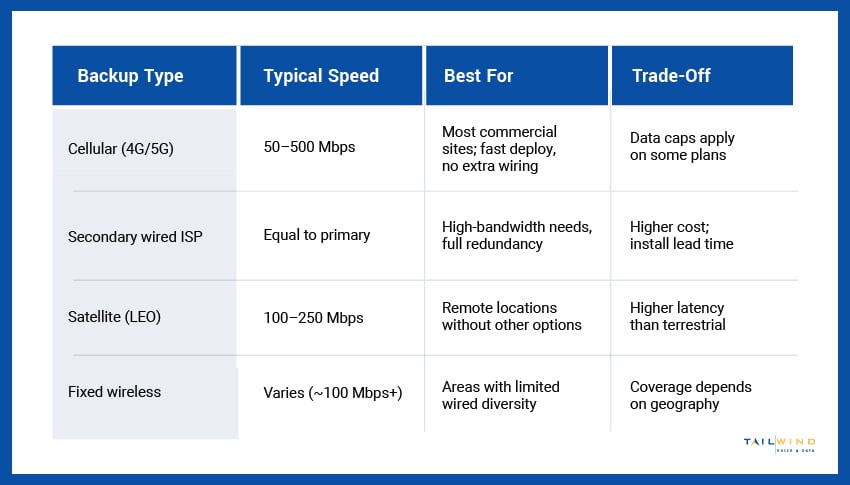
Cellular backup internet – sometimes called wireless backup internet – uses 4G LTE or 5G connectivity through a router with an embedded modem and SIM card. For most commercial deployments, cellular internet backup for business is the most practical choice: fast to deploy, no additional wiring required, and increasingly capable as 5G coverage expands.
Secondary Wired ISP
A second wired ISP from a different carrier provides the strongest redundancy at locations where backup bandwidth needs to match primary bandwidth, such as high-volume operations, contact centers, and large offices. The key is ensuring the two carriers actually use diverse network paths into the building, not just two services on the same physical infrastructure.
Satellite (LEO)
Where a location has no second wired carrier and weak cellular coverage, low-earth-orbit satellites deliver usable speeds that keep systems running during an outage. Latency runs higher than terrestrial connections with this method, which makes it best for sites that don’t have other options readily available, such as rural and remote locations.
Fixed Wireless
Fixed wireless delivers connectivity over a radio link between a provider's tower and an antenna at your site, bypassing the wired infrastructure your primary circuit depends on to provide path diversity. Performance depends on line of sight and distance to the tower, so coverage and achievable speeds vary by geography and need to be confirmed per location.
What To Look For When Choosing An Internet Failover Service
The right internet failover service should provide a complete redundancy solution backed by ongoing management. Here’s what matters most:
Detection Speed
How quickly does the system identify a failed or degraded primary connection? Sub-30-second detection is the standard for modern enterprise solutions.

Bandwidth Match
Your backup should sustain your critical operations, not just keep the lights on with degraded performance.
Network Path Diversity
True redundancy requires backup that doesn't share infrastructure with the primary connection. Verify this at the building level.
Centralized Management
The service should provide monitoring, alerting, and reporting across all sites from a single platform.
Proactive Support
Someone should know when failover triggers at 2 am and already be coordinating restoration, not waiting for you to open a ticket in the morning.
Internet Failover Solutions For Multi-Location Businesses
Enterprises with multiple sites need internet failover solutions that work consistently across every location, and the operational complexity scales fast. For multi-location failover deployments, make sure to consider:
- Standardized SD-WAN or failover routers across all sites for consistent behavior and monitoring.
- Cellular backup with appropriate data plans sized to actual usage during outages.
- Centralized visibility into failover events across the entire network.
- Documented and tested procedures that work in practice, not just on paper.
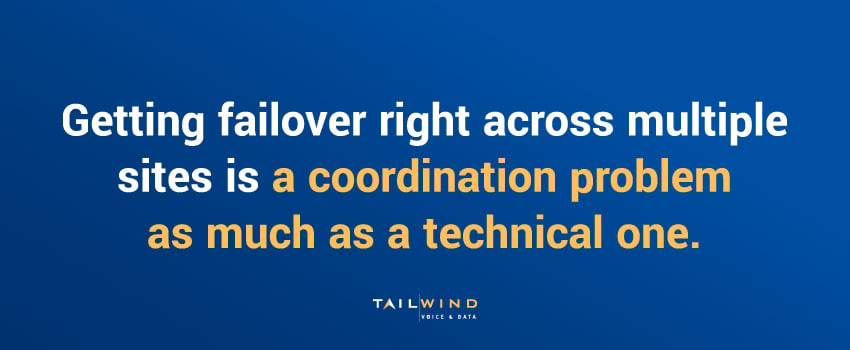
Getting these right across dozens or hundreds of sites is a coordination problem as much as a technical one. TailWind’s nationwide rollout services provide the consistent standards, centralized monitoring, and operational reach to deploy and manage backup connectivity everywhere your business operates.
Internet Failover FAQs
What Is Internet Failover?
Internet failover is the automatic switching of network traffic from a failed or degraded primary connection to a secondary backup connection. When your main internet circuit drops, or its performance falls below acceptable thresholds, traffic reroutes to the backup link, ideally without users noticing the change. Its purpose is to remove the single point of failure that a lone internet connection creates, so an outage at your primary carrier doesn’t take your phones, cloud apps, and payment systems offline with it.
How Does Internet Failover Work?
Internet failover runs on a network device, usually a router or SD-WAN appliance, that monitors the primary connection around the clock. It watches for total connection loss, degraded performance such as high latency and packet loss, or failed reachability tests against external targets. When it detects a failure, it automatically reroutes traffic to the backup connection. The device keeps checking the primary link while you’re on backup, then shifts traffic back once the primary connection is stable again, a step known as failback.
Why Does A Business Need Internet Failover?
A single internet outage can cost far more than a backup connection. More than 90% of midsize and large enterprises say one hour of downtime costs them over $300,000, and 54% of organizations reported that their most recent major outage cost more than $100,000. Beyond lost revenue, an outage knocks out VoIP phones and video conferencing, locks employees out of cloud-based ERP and CRM tools, erodes customer trust, and can trigger compliance issues in regulated industries.
How Long Does It Take For Internet Failover To Switch Over?
Modern internet failover systems switch traffic to the backup connection within seconds of detecting a problem, which is fast enough for most application sessions to survive the transition. Detection speed is the other half of the equation, and sub-30-second detection is the standard for enterprise solutions. When both pieces work as intended, what would have been a multi-hour outage becomes a brief transition that users never notice.
What Equipment Do You Need For Internet Failover?
You need a router or SD-WAN appliance that can manage two connections, monitor the primary link, and reroute traffic automatically when it fails. For cellular backup, that device includes an embedded modem and SIM card that connects over 4G LTE or 5G. You also need the backup connection itself, whether that’s cellular, a second wired ISP, LEO satellite, or fixed wireless. Businesses with several sites benefit from standardizing on the same SD-WAN or failover routers everywhere for consistent behavior and monitoring.
What Is The Best Backup Internet Connection For Business?
For most commercial locations, cellular backup over 4G LTE or 5G is the most practical choice because it deploys quickly and needs no additional wiring. A secondary wired ISP from a different carrier offers the strongest redundancy where backup bandwidth must match the primary, such as contact centers and large offices. Low-earth-orbit satellite suits rural or remote sites with no second wired carrier and weak cellular coverage, while fixed wireless adds path diversity wherever line of sight to a provider’s tower allows it.
Why Does Network Path Diversity Matter For Internet Failover?
Path diversity matters because a backup connection that shares infrastructure with the primary can fail at the same time. Two services from different carriers offer little protection if both run through the same physical path into your building. True redundancy requires a backup that doesn’t depend on the same cables or entry point, so it’s worth verifying diversity at the building level. Fixed wireless and cellular connections naturally provide this separation, since they bypass the wired infrastructure your primary circuit relies on.
How Do Multi-Location Businesses Manage Internet Failover?
Multi-location businesses need failover that behaves the same way at every site, which makes standardization the starting point. That means using the same SD-WAN or failover routers across locations, sizing cellular data plans to actual usage during outages, and keeping centralized visibility into failover events across the whole network. Procedures should be documented and tested so they work in practice, not just on paper. Across dozens or hundreds of sites, getting this right is a coordination problem as much as a technical one.
Keep Your Organization Online 24/7 With TailWind
The best failover deployment is the one nobody remembers, because the outage it covered never reached a customer, a phone line, or a checkout terminal. That invisibility is the whole point, and it only happens when the backup connection is sized correctly and managed properly.
TailWind’s broadband aggregation services source primary and backup connectivity from the right mix of carriers at every location, managed under one relationship with one point of contact. For enterprises wanting fully managed failover with 24/7 monitoring and incident response, our NOCaaS solution handles the watching, alerting, and resolution coordination – so your team learns about outages from a status update, not a customer complaint.
Reach out today to get started, and let's build connectivity that stays online when you need it.
Sources: