At a certain point in a business's growth, a single phone line becomes a bottleneck. Customers get busy signals, staff can't transfer calls, and multiple departments compete for the same line.
A multi-line phone system solves all of that – and for most businesses managing more than a handful of employees or locations, it's the standard infrastructure for handling voice communications.
Read on to learn what a multi-line phone system is, how it works, and how to set one up and use it effectively.
TL;DR
-
A multi-line phone system routes simultaneous inbound and outbound calls across shared extensions, lines, and connected devices.
-
Cloud-hosted VoIP is typically the most scalable and cost-effective option, offering PBX functionality without on-site hardware maintenance.
-
Reliable performance depends on sufficient bandwidth, SIP trunk capacity, PoE, QoS, structured cabling, and thorough pre-launch testing.
-
Cloud-based systems can connect multiple locations through one PBX, provided every site has adequate connectivity and properly configured infrastructure.
What Is A Multi-Line Phone System?
A multi-line phone system allows a business to handle multiple simultaneous calls across a shared network of phones. Rather than giving each handset its own dedicated outside line, a multi-line system routes inbound and outbound calls across a pool of lines.
The purpose of a multi-line phone system is simple: it's the infrastructure that enables business-grade phone behavior. Most multi-line systems today are delivered via VoIP (voice over IP), with 77% of enterprises using VoIP as a primary part of their telephony approach.1
What Are The Types Of Multi-Line Phone Systems?
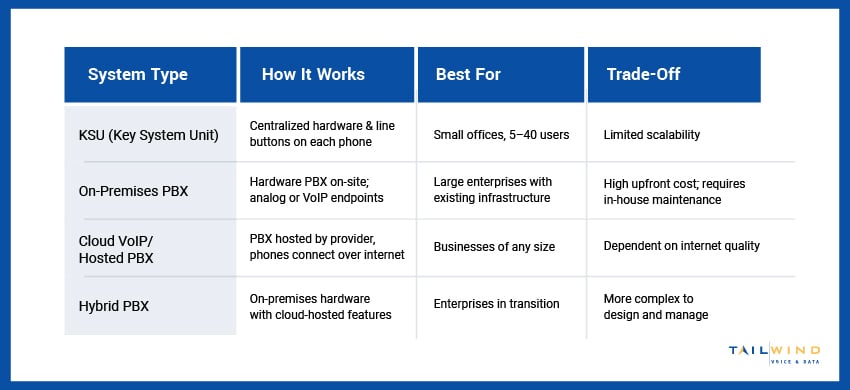
Each type of multi-line phone system offers its own set of benefits and potential downsides. Here's how the main options compare:
Cloud-Based VoIP Systems
A cloud-based system routes calls over your internet connection instead of physical copper lines. Lines are SIP trunk channels defined in software, so you can add capacity without running new wiring, and there is no PBX hardware to maintain on site. Your team uses the same business number across desk phones, laptops, and mobile apps, which makes it the practical choice for remote and multi-location teams. Upfront cost is lower than an on-premises build, and scaling up or down happens in the admin portal.
On-Premises PBX & KSU Systems
An on-premises system runs on physical hardware installed in your building, either a PBX or a smaller key system unit (KSU), with telephone lines wired directly to it. Each desk phone has physical line buttons mapped to dedicated lines, which is why these are sold as 2-line, 4-line, or 12-line phones. Because everything lives on site, the system is tied to that location and depends on in-house or contracted maintenance. It gives you direct control over the hardware, but it scales slowly: adding lines usually means adding physical connections.
Most businesses setting up or upgrading a multi-line system today will likely need a cloud-hosted VoIP system. It's scalable, lower in upfront cost, and delivers the same feature set as a hardware PBX without the maintenance burden.
How Does A Multi-Line Phone System Work?
Knowing how a multiple phone line system works can help clarify what you actually need to set one up. The core components are:
- PBX (Private Branch Exchange): The switching system that manages internal call routing. In modern deployments, this is typically a cloud-hosted PBX or UCaaS platform.
- Extensions: Each phone or user gets an extension number – a short internal dial code. When a call comes in, the system routes it to the right extension based on IVR selections, ring group rules, or direct dial.
- Lines (SIP Trunks): The outside connections to the PSTN (public telephone network) or VoIP carrier. The number of active lines determines how many simultaneous external calls the system can handle. On a VoIP system, lines are SIP trunk channels, which are software-defined and easily scalable.
- IP Phones or Softphones: Physical desk phones connect via Ethernet to the network; softphones are apps that run on computers or mobile devices. Both register to the PBX and function identically from a features standpoint.
- Network Infrastructure: The Ethernet switches, cabling, and internet connection on which all of the above run. The quality and configuration of this layer directly determine call quality.
The network infrastructure is where multi-line phone system deployments most often run into trouble. VoIP call quality is sensitive to bandwidth, latency, packet loss, and jitter in ways that data applications often aren't. Before any system configuration happens, the network needs to be ready for voice.
At TailWind, we offer structured cabling and carrier services to ensure that your physical and connectivity layers are built for better voice performance from the start.
How To Set Up A Multi-Line Phone System
Setting up a multi-line phone system requires careful planning and execution across five key steps:
Assess Your Infrastructure
Make sure to check your network’s:
- Available bandwidth (100 Kbps per concurrent VoIP call is a reliable rule of thumb)
- PoE support on your switches
- QoS configuration for voice traffic
TailWind's network engineering experts can assess your infrastructure and identify gaps in your network before they become call quality issues, saving you months of troubleshooting post-go-live.
Choose Platform & Size Lines
Select your VoIP or UCaaS platform based on your user count and the features you’ll need. And since insufficient trunk channels at peak times can mean blocked calls, make sure to size your system’s SIP trunk capacity for your peak concurrent calls, not your average volume.
Design Call Flow
Map out your auto-attendant menus, ring groups, hunt sequences, and after-hours behavior before configuring anything. Changes made post-go-live disrupt users, so aim to complete the design upfront.
Deploy & Provision
IP desk phones connect using Ethernet and power via PoE, then auto-provision extensions from the PBX. For multi-location deployments, TailWind’s stage and configuration services pre-configure every device at our facility before shipping – so your phones arrive ready to plug in.
Test Before Cutover
Test every extension, ring group, IVR path, hold, and transfer behavior from both internal and external numbers before going live. Issues found post-cutover can cost you customers, but issues found in testing only cost minutes.
How To Use A Multi-Line Phone System: Day-To-Day Features
Once your system is live, the primary features your staff need to understand are consistent across most platforms:
- Placing a Call on Hold: Most multi-line systems include either a Hold button or a dedicated line button. When you press that button, the caller hears hold music until you return to the line.
- Transferring a Call: Blind transfer connects a caller directly to another extension without announcement. Attended transfer lets you speak to the recipient before completing the transfer.
- Using Multiple Lines: Modern IP phones display line status visually – lit buttons show active calls, flashing buttons show calls on hold. You can toggle between calls using the line keys or softkeys.
- Setting up a Conference Call: Most multi-line phone systems support ad-hoc conferencing directly from the phone. Consult your platform's documentation for the specific key sequence, as it varies by handset and platform.
- Forwarding Calls: Call forwarding can be configured per extension to another internal extension, to a mobile number, or to voicemail on a scheduled or immediate basis.
A quick training session on your platform's documentation before go-live prevents confusion and support calls. Once these basics are mastered, your staff can focus on customer interactions rather than figuring out how to transfer a call.
How To Use A Multi-Line Phone System Across Multiple Locations
A cloud-based multi-line system enables multiple business locations to run on the same PBX instance. That means that, regardless of how many sites your business operates, a call to any extension will reach the correct location, and management and configuration happen from a single admin portal.
However, making this work requires that each of your locations has adequate internet connectivity and properly configured network infrastructure – not just at headquarters. If you’re rolling out a phone system across a multi-location enterprise, TailWind’s nationwide field services team can coordinate deployment across all sites to ensure consistent infrastructure and a clean go-live at every location.
Multi-Line Phone System FAQs
What Is A Multi-Line Phone System?
A multi-line phone system lets a business handle several calls at the same time across a shared pool of lines, rather than giving each phone its own dedicated outside line. Inbound and outbound calls are routed across that pool, so a second caller reaches another line, voicemail, or an auto-attendant instead of a busy signal. Most systems today run on VoIP, which delivers this over your internet connection. It is the standard setup for businesses with more than a handful of employees or locations.
How Does A Multi-Line Phone System Work?
The system connects a few core parts. A PBX (usually cloud-hosted) handles call routing, extensions give each user a short internal dial code, and lines (SIP trunk channels on VoIP) set how many external calls can run at once. Desk phones or softphone apps register to the PBX and behave the same way feature-wise. Underneath it all sits your network: the switches, cabling, and internet connection that carry the calls. Call quality depends heavily on that network layer being configured for voice.
How Do I Set Up A Multi-Line Phone System?
Setup runs in five steps. First, assess your network for available bandwidth, PoE on your switches, and QoS for voice traffic. Next, choose your VoIP or UCaaS platform and size your SIP trunk capacity for peak concurrent calls, not average volume. Then design your call flow: auto-attendant menus, ring groups, and after-hours behavior. Deploy and provision the phones, which auto-configure from the PBX over Ethernet. Finally, test every extension, transfer, and IVR path from both internal and external numbers before you cut over.
How Do I Use A Multi-Line Phone System Day To Day?
Once the system is live, the core features are consistent across platforms. You place callers on hold with a hold or line button, transfer calls either blind (straight through) or attended (after speaking to the recipient), and switch between active calls using the line keys. Most systems also support ad-hoc conference calls from the handset, plus per-extension call forwarding to another extension, a mobile number, or voicemail. A short training session on your platform's documentation before go-live is usually enough for staff to pick these up.
What Is The Difference Between Phone Lines And Users?
Lines and users measure two different things. A line (on VoIP, a SIP trunk channel) is a path for a single simultaneous call, so line count sets how many calls the system can carry at once. A user is a person with an extension and a login. On older systems you paid per line, which capped concurrent calls. On most cloud VoIP plans you pay per user, and one user can place or receive several calls at once, so you size trunk capacity for peak concurrent volume rather than for headcount.
Do I Need Special Internet For A Multi-Line Phone System?
You do not need a special internet product, but the connection has to be ready for voice. A common rule of thumb is about 100 Kbps per concurrent VoIP call, so bandwidth has to cover your peak call volume with room to spare. More important than raw speed is stability: VoIP is sensitive to latency, packet loss, and jitter in ways that email and web browsing are not. Quality of Service settings that prioritize voice traffic, plus adequate connectivity at every location, are what keep calls clear.
How Do You Handle Multiple Calls At Once On A Multi-Line Phone?
Each call sits on its own line, and the phone shows their status visually. On IP desk phones, lit line buttons indicate active calls and flashing buttons indicate calls on hold. To juggle two callers, put the first on hold with the hold or line key, answer or place the second on another line, then toggle between them using the line keys or softkeys. The caller on hold hears hold music until you return. Softphone apps show the same call states on screen, so you tap to switch.
How Do You Transfer A Call On A Multi-Line Phone System?
There are two transfer types. A blind transfer sends the caller straight to another extension without announcing them: press transfer, dial the extension, and hang up. An attended transfer lets you speak to the recipient first, so you press transfer, dial the extension, wait to talk to that person, then complete the transfer. Attended transfers are better when the caller needs context handed over; blind transfers are faster for simple routing. Exact key sequences vary by handset and platform, so check your phone's documentation.
Build A Phone System That Scales With Your Business
A well-deployed multi-line phone system gives your team the voice infrastructure they need to handle calls professionally – at one location or fifty. But while the technology itself is accessible, the infrastructure it runs on has to be right. Cabling, network quality, carrier connectivity, and pre-deployment configuration all determine whether your system performs or becomes a daily frustration.
TailWind works with businesses at every stage – from scoping the network to coordinating multi-location rollouts. If you're planning a new phone system or upgrading what you have, get in touch with our team and let's make sure it's built on a foundation that delivers.
Sources: