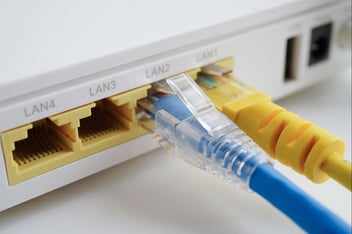
Your router does a lot of heavy lifting to keep your business connected, but it can only reach so far in a large office or multi-floor building. And when your router can’t keep up, dead zones creep in, devices drop signal, and internet performance degrades right when employees need it most.
That's where wireless access points come in – and for multi-location businesses, understanding how they work is a must for building a network that actually performs everywhere it needs to.
TL;DR
-
A wireless access point is a networking device that connects to a wired router or switch over Ethernet and broadcasts a WiFi signal, extending reliable coverage beyond the range a single router can reach.
-
Unlike a range extender that rebroadcasts a signal wirelessly and roughly halves bandwidth, an access point uses a wired Ethernet backhaul to deliver full network speed to every connected device.
-
Business deployments should secure access points with WPA2 or WPA3 encryption and use VLAN-based segmentation to keep guest, employee, IoT, and point-of-sale traffic isolated from one another.
-
For multi-location businesses, performance depends on the right hardware and placement: WiFi 6 or 7 support, PoE, cloud-based central management, and a site survey to size and position each access point.
What Is An Access Point? A Brief Definition
An access point (AP) is a networking device that deploys a wireless local area network (WLAN) by connecting to a wired router or switch via an Ethernet cable. It then broadcasts a WiFi signal to nearby devices, extending your network's reach beyond what a single router can cover.
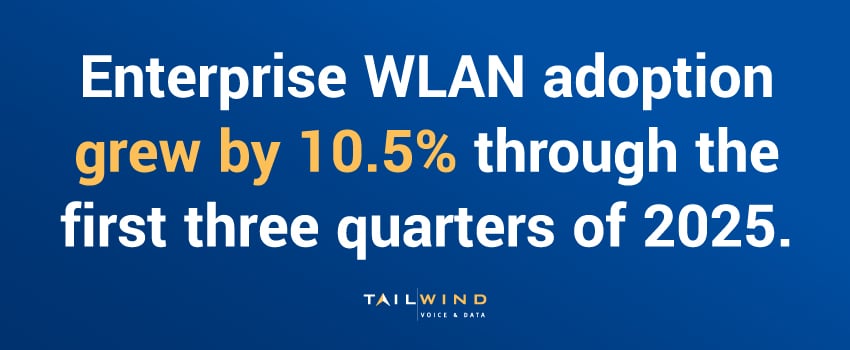
Enterprise WLAN adoption grew by 10.5% through the first three quarters of 2025.1 No surprise, considering access points let you extend WLAN capabilities for stronger performance in high-density environments. While a single router might cover a small office, adding a few well-placed APs sends consistent WiFi coverage across an entire floor, building, or campus.
Access Point WiFi vs Router vs Range Extender: What's The Difference?
These three devices are often confused because they all deal with WiFi, but they serve very different purposes. Here's a quick breakdown:
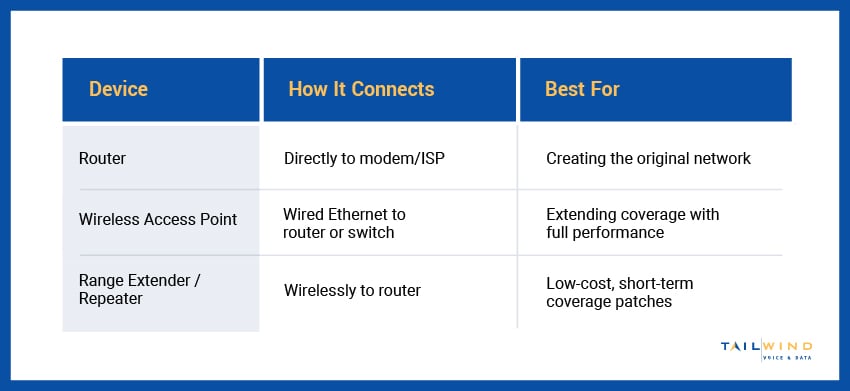
Range extenders are easy to deploy, but because they receive the WiFi signal wirelessly and re-broadcast it, they typically cut available bandwidth in half.
Access points use a wired backhaul connection, meaning they deliver the full speed of your network to every device in their range. For any business environment where performance matters, access points are the right call.
What Is A Wireless Access Point & How Does It Work?
A wireless access point bridges the gap between your wired infrastructure and the wireless devices that need to connect to it. Here's the basic flow:
- A switch or router delivers internet connectivity over a wired Ethernet connection to the access point
- The access point converts that wired signal into a WiFi broadcast
- Wireless devices – laptops, phones, tablets, IoT equipment – detect and connect to that broadcast
- Traffic flows between the device and the network through the access point
Modern wireless access points also handle more than basic connectivity. Enterprise-grade APs support features like band steering (automatically directing devices to the 5 GHz band for better performance), seamless roaming between access points without dropping the connection, and traffic segmentation through multiple SSIDs – for example, keeping guest WiFi separate from the internal network.
Wireless Access Point Security & Segmentation
A wireless access point sits at the edge of your network, broadcasting a signal any nearby device can try to reach, which makes securing it as important as placing it well. A poorly secured AP is an open door to everything behind it, so enterprise deployments treat encryption, segmentation, and access control as part of the setup, not an afterthought.
Encryption With WPA2 & WPA3
Every business AP should enforce strong encryption on its wireless traffic. WPA2 is the long-standing baseline, while WPA3 adds stronger protection against password-guessing and better safeguards on open networks. For larger environments, WPA2 or WPA3-Enterprise pairs the access point with a RADIUS server, so each user authenticates with their own credentials instead of a single shared WiFi password.
Network Segmentation & Guest Access
Segmentation is where access points earn their keep on security. By broadcasting multiple SSIDs mapped to separate VLANs, a single AP can keep guest traffic, employee devices, IoT equipment, and point-of-sale systems isolated from one another. If a guest laptop or a smart thermostat is compromised, segmentation stops that device from reaching sensitive internal systems. Guest networks in particular should always be walled off from the internal network, not just given a different name.
Access Control & Firmware Updates
Beyond encryption and segmentation, a few operational habits keep APs from becoming weak points. Change default administrator credentials before an AP ever goes live, since factory logins are widely published. Keep firmware current, because manufacturers patch security flaws through updates that only help if you apply them. In managed deployments, a central controller makes this practical, pushing consistent security policies and firmware to every access point at once instead of device by device.
4 Wireless Access Points Types
Not all APs will work for the same environments. Let’s explore how each type supports different spaces, device density needs, and network management approaches below.
Indoor Access Points
Indoor APs are the most common type of access point for office and commercial environments. They come in a range of tiers – from basic models supporting dozens of devices to high-density APs built for conference rooms, classrooms, or retail floors with hundreds of simultaneous connections.
Outdoor Access Points
Outdoor APs are ruggedized, weatherproof units that can handle extreme temperatures, moisture, and direct sunlight. They’re used by businesses with outdoor spaces that need coverage, like warehouses, drive-throughs, or event venues.
Ceiling-Mount vs Wall-Mount Access Points
Ceiling-mount APs broadcast the WiFi signal downward in a wide pattern, making them ideal for open floor plans.
Wall-mount APs project the WiFi signal horizontally, which works better for hallways or rooms where ceiling mounting isn't an option.
Controller-Based vs Cloud-Managed Access Points
Enterprise deployments often use either a dedicated wireless controller or a cloud management platform to handle all access points centrally.
Cloud-managed systems have become the standard for multi-location businesses. They allow IT teams to push configuration changes, monitor performance, and troubleshoot issues across all sites from a single dashboard – a major operational advantage when you're managing WiFi across dozens or hundreds of locations.
How WiFi Access Points Extend Coverage In Business Environments
Deploying APs effectively isn't just a matter of plugging them in and hoping for the best. Where you place them, how many you install, and how they're configured will all affect the quality of your wireless network.
Here are a few guidelines for proper access point placement:
- Mount APs High: Ceiling-mount installations maximize your broadcast range and minimize obstructions from furniture and equipment.
- Avoid Interference Sources: Devices like microwaves, cordless phones, and neighboring WiFi networks can all interfere with an AP’s performance.
- Plan for Density: A space with 100 devices will need a different AP strategy than a space with only 10, even if the square footage is the same.
- Use Structured Cabling: Every AP needs a reliable wired connection to perform at its rated speed. Properly installed structured cabling is the foundation of any high-performing wireless deployment.
If you want to make sure you place your APs correctly from the start, a WiFi survey from TailWind can help. Our engineers use specialized tools to map signal strength, identify interference, and determine optimal placement before you’ve even mounted a single device.
The result is a design that delivers consistent coverage without dead zones or overlapping interference – the kind of over-the-air performance that a trial-and-error deployment rarely achieves.
What To Look For In Access Points For A Multi-Location Business
WiFi consistency across all sites is non-negotiable for distributed enterprises, whether you’re running retail locations, medical offices, restaurants, or financial branches. Customers and employees expect the same experience whether they're at your flagship location or a satellite office.
When evaluating access points for an enterprise deployment, the key criteria are:
WiFi 6, WiFi 6E, Or WiFi 7 Support
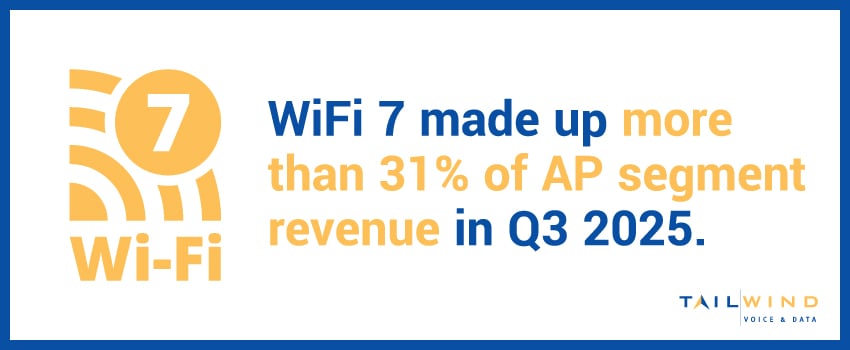
The latest standards deliver faster speeds, better performance in high-density environments, and improved efficiency for IoT-heavy deployments. WiFi 7 adoption is growing in enterprise environments, making up more than 31% of AP segment revenue in Q3 2025.1 But for most enterprise deployments, WiFi 6 or WiFi 6E is still the practical choice with broad device support and proven reliability.
MU-MIMO & OFDMA
MU-MIMO (Multi-User Multiple-Input Multiple-Output) and OFDMA (Orthogonal Frequency-Division Multiple Access) are technologies that allow the AP to serve multiple devices simultaneously – critical in busy commercial environments.
PoE (Power over Ethernet) Compatibility
PoE compatibility simplifies AP device installation by providing power and data through a single cable, eliminating the need for a separate power outlet for each device.
Centralized Management
Cloud-managed platforms allow your team, or a trusted managed IT provider like TailWind, to monitor and configure all access points from one place, regardless of how many sites you operate.
Seamless Scalability
Your AP system should grow with your business without requiring a forklift upgrade every time you add locations or increase device density.
Wireless Access Point FAQs
What Is A Disadvantage Of A Wireless Access Point?
The main tradeoff is that an access point needs a wired connection to work. Unlike a range extender you simply plug in, every AP requires an Ethernet cable run back to a switch or router, which means cabling and, for multiple units, more planning and cost. APs also need proper placement and configuration to perform well, so a poorly positioned or unmanaged AP can create dead zones or interference. For most business environments, though, the wired backhaul that causes this tradeoff is exactly what delivers full, reliable speed.
How Many Access Points Does My Business Need?
It depends on more than square footage. The right number comes down to your floor plan, building materials, the number of simultaneous devices, and the applications you run, since a dense conference room or retail floor needs more APs for capacity even when the area is small. Walls, floors, and interference all shrink an AP's usable range, so coverage rarely matches the numbers on a spec sheet. The reliable way to size a deployment is a WiFi site survey, which maps real signal strength and interference before any hardware goes up.
How Many Devices Can A Single Access Point Handle?
On paper, many business access points advertise support for 250 or more simultaneous connections, and high-capacity Wi-Fi 6 and Wi-Fi 7 models claim far higher. In practice, the realistic number is lower, often a few dozen active devices per AP, because heavy use like video calls and file transfers consumes far more capacity than idle connections. Device type matters too, since IoT sensors demand little while laptops streaming video demand a lot. For high-density spaces, plan around real usage rather than the maximum on the datasheet.
Is A Wireless Access Point The Same As A Hotspot?
No. An access point is a fixed device wired into your network that provides ongoing WiFi coverage across a defined area, like an office or building. A hotspot is usually a temporary connection, most often a phone or portable device sharing its cellular data so nearby devices can get online. They can look similar to the person connecting, but an access point is part of permanent network infrastructure, while a hotspot is a short-term, mobile way to reach the internet.
Is A Wireless Access Point The Same As A Wi-Fi Extender?
No. Both expand where you can get WiFi, but they work differently. A Wi-Fi extender receives an existing wireless signal and rebroadcasts it, which is easy to set up but typically cuts available bandwidth roughly in half. An access point connects to your network over a wired Ethernet backhaul and delivers full network speed to every device in its range. For homes or quick fixes, an extender can be enough; for business environments where performance matters, access points are the better choice.
How Do I Find The Wireless Access Point On My Network?
On a business network, access points usually appear in your management platform or controller dashboard, which lists every AP by name, model, and status. Without a controller, you can check your router or switch's admin interface for connected devices, or use a WiFi analyzer app to spot the SSIDs and signal sources around you. The AP's physical location is often labeled on the device or documented in your network's cabling records, which is one reason clear as-built documentation pays off later.
Build A WiFi Network That Works Everywhere With TailWind
A well-designed access point deployment is the difference between a WiFi network that technically exists and one that actually performs. For businesses with multiple locations, high device density, or demanding applications, the stakes are even higher.
If you're starting from scratch, upgrading aging infrastructure, or dealing with dead zones you haven't been able to crack, TailWind is here for you. We designed our Business WiFi solutions to help multi-location enterprises select, deploy, and manage access point infrastructure that delivers reliable, consistent performance – without leaving your internal team to figure it out alone.
Get in touch with our team and let's build a wireless network your business can count on.
Sources: