TL;DR
-
A modem connects your business to your ISP and translates its signals, while a router shares that connection with your devices and provides WiFi and security.
-
Both devices are essential, since a modem brings the internet in and a router distributes it across your network.
-
For enterprise networks, separate modem and router devices usually beat a combo unit, giving you more control, easier updates, and more reliable performance.
-
Choose a modem that matches your ISP's connection type, and a business router with VLANs, SD-WAN, strong security, and failover to keep performance steady as you grow.
If you've ever set up internet service for your business or home, you've likely come across the terms modem and router. While they’re often used together, and sometimes even bundled into a single device, they serve different purposes.
At TailWind, we provide internet access and network support to multi-site enterprises across the U.S., so we’re often asked: “What is the difference between a modem and a router?" Let’s clear it up.
What Is A Modem?
A modem is the device that connects your business network to your Internet Service Provider (ISP) via coaxial cable, DSL, or fiber lines. Once connected, the modem converts analog signals from your ISP into digital data that your devices can understand, and vice versa. It also serves as your network’s gateway to the public internet.
For businesses, the modem type and capacity matter for performance and uptime – especially with 84% of businesses reporting an increase in network outages over the past two years.1 A cable modem might work for smaller offices, but larger enterprises often need fiber-based modems that support higher throughput and redundancy.

What Is A Router?
While the modem connects your network to the internet, the router distributes that connection to all your devices. It creates your local network and manages communication between computers, phones, printers, and other connected systems – wired and wireless.
Key functions of a router include:
- Directing traffic between devices on a local network
- Enabling Wi-Fi access for wireless devices
- Providing network security through firewalls and other controls
Routers can do more than just provide connectivity in multi-location environments. Enterprise-grade routers enable centralized management, remote access, and traffic prioritization through features like VLANs, SD-WAN, and Quality of Service (QoS).
Modem vs Router: Compared
Although they often work side by side, these devices perform very distinct functions. Here’s a closer look at the difference between a modem and a router:
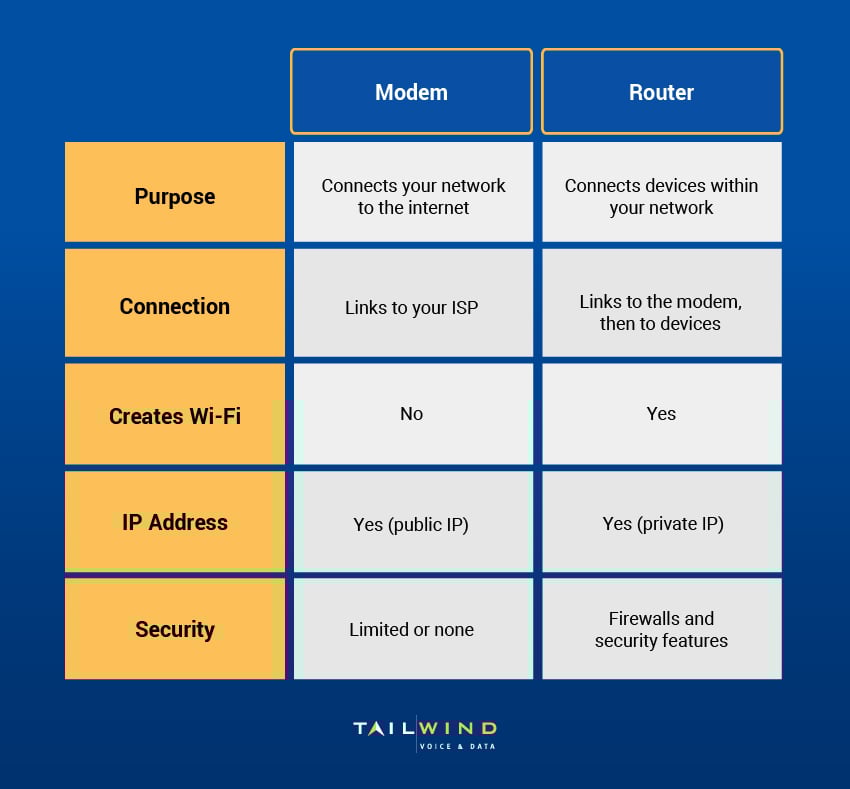
Basically, a modem brings the internet into your network, while a router takes that connection and shares it with every device that needs access. Both are essential components for enterprises.
What’s The Difference Between A Modem And A Router For Businesses?
The way a modem and router are configured can have a major impact on how your enterprise network performs. Unlike home setups, business networks have to support several users, multiple applications, and often multiple locations.
Business Modem Considerations
- Must support higher throughput (Gigabit+)
- Needs to be compatible with fiber or dedicated internet
- Should support SLAs that guarantee uptime
Business Router Considerations
- Should enable VLANs, QoS, and SD-WAN features
- Supports remote management and monitoring
- Can scale across multiple locations
- Offers security features (access controls, intrusion prevention, etc.)
- Must integrate with other network hardware
Not sure how to find the right router and modem to meet your organization’s specific needs and growth goals? At TailWind, we work with distributed businesses to architect networks that are fast, secure, and scalable.
Can You Use A Combined Modem-Router Device?
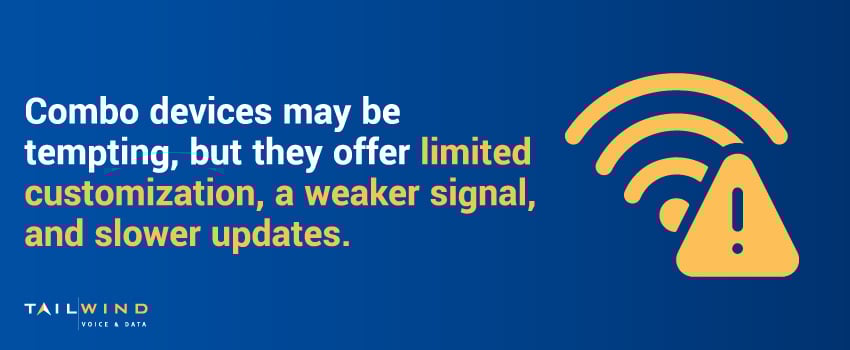
Combo modem-router devices may be tempting for their simplicity, but they come with some trade-offs.
Combined units are easier to install and reduce the number of devices you need to manage. However, they often have limited customization options, a weaker signal range, and slower firmware updates. And if one function fails – either the modem or router – you typically have to replace the entire device.
For enterprise networks, we generally recommend using separate devices so that you can implement advanced configurations, perform updates without impacting connectivity, and maintain consistent performance across each location.
Modem vs Router: What Should You Buy?
Selecting the right modem and router for your business will come down to your organization’s specific needs. Here are a few practical guidelines:
1. Focus On Connection Speed
Choose a modem that matches your ISP’s connection type and speed tiers. If your internet service is delivered through fiber, make sure the modem supports those speeds and interfaces. The same goes for cable or DSL connections.
2. Avoid Combo Units
While combination modem-router devices may work for smaller offices, they typically can’t handle the demands of distributed enterprise operations. Using separate, high-quality devices provides more control and reliability.
3. Look For Advanced Features
A business-class router should offer features like VPN support, QoS controls, and multiple WAN ports for redundancy. Enterprise routers should also allow centralized monitoring and management for multi-site visibility.
4. Evaluate Security Capabilities
Business routers vary in their built-in security capabilities. Some support firewalls, segmentation, and remote access policies, while others offer only basic protections. Make sure your devices offer the right mix of features for your environment.
5. Consider Scalability Needs
Connected IoT devices are projected to grow to 39 billion by 2030,2 so choosing equipment that can scale is a must for avoiding unnecessary upgrades and keeping performance stable as your business evolves.

6. Plan For Redundancy & Failover
A router that supports failover options like secondary WAN ports or LTE backup is essential for sites that need consistent uptime. Redundancy can be especially important for locations that depend on cloud tools or process customer transactions throughout the day.
Modem vs Router FAQs
What Is The Difference Between A Modem And A Router?
A modem connects your network to the internet, while a router shares that connection with all your devices. The modem links to your Internet Service Provider through coaxial, DSL, or fiber lines and converts the ISP's signals into data your devices can use. The router then creates your local network, directing traffic between computers, phones, and printers, and providing WiFi and security features like firewalls. Put simply, the modem brings the internet in, and the router distributes it. Both are essential parts of any business network.
Do You Need Both A Modem And A Router For Internet?
Yes, most networks need both because they do different jobs. The modem is what actually brings the internet into your location from your ISP, but on its own it can't share that connection or manage a local network. The router takes the modem's single connection and distributes it to every device, wired and wireless, while handling traffic and security. Without a modem you have no internet; without a router you can't efficiently connect multiple devices. For any business with more than one user, both are essential.
Does The Modem Or The Router Provide Your WiFi?
The router provides WiFi, not the modem. A modem's job is to connect your network to your ISP and translate signals, but it doesn't broadcast a wireless network on its own. The router creates your local network and enables WiFi access for wireless devices, alongside managing traffic and security. If your internet comes through a single combined unit, that device is handling both roles at once. In a setup with separate devices, the router is always the piece responsible for your WiFi.
Should You Use A Combo Modem-Router Or Separate Devices?
For enterprise networks, separate devices are usually the better choice. Combo modem-router units are easier to install and reduce the number of devices to manage, but they come with trade-offs: limited customization, weaker signal range, and slower firmware updates. If one function fails, you often have to replace the whole unit. Using separate devices lets you apply advanced configurations, update one device without disrupting connectivity, and keep performance consistent across locations. A combo may suit a small office, but distributed businesses generally benefit from keeping the two apart.
How Do You Choose The Right Modem For Your Business?
Match the modem to your ISP's connection type and speed tiers. If your service is delivered over fiber, the modem needs to support those speeds and interfaces; the same applies to cable or DSL connections. Business modems should handle higher throughput, often Gigabit or more, and support service-level agreements that guarantee uptime. Larger enterprises frequently need fiber-based modems built for higher capacity and redundancy, since a cable modem suited to a small office may not keep up with multi-site demands.
What Features Should You Look For In A Business Router?
A business-class router should support centralized management and traffic control across multiple locations. Look for VLANs, Quality of Service (QoS), and SD-WAN to prioritize and segment traffic, plus multiple WAN ports for redundancy. Remote management and monitoring give your team multi-site visibility, and the router should scale as you grow, which matters as connected IoT devices are projected to reach 39 billion by 2030. It also needs to integrate cleanly with the rest of your network hardware.
What Security Capabilities Should A Business Router Have?
At minimum, a business router should provide firewalls and access controls, but the strongest options go further. Look for network segmentation, intrusion prevention, and VPN support to protect traffic and limit exposure if one part of the network is compromised. Routers vary widely here, with some offering only basic protection, so confirm the device matches the security demands of your environment. This matters most for organizations handling sensitive customer data or operating in regulated industries where a breach carries serious consequences.
Why Do Failover And Redundancy Matter For Businesses?
Failover and redundancy keep your network online when something goes wrong, which is critical given that 84% of businesses report rising network outages over the past two years. A router that supports secondary WAN ports or LTE backup can maintain connectivity if your primary link drops. This is especially important for locations that depend on cloud tools or process customer transactions throughout the day, where even short downtime is costly. Building redundancy into your modem and router setup protects both uptime and revenue.
Choose The Right Hardware With TailWind
Understanding the difference between modem and router technology is the first step to building a reliable business network. However, there’s a lot more to consider when it comes to configuring and maintaining your enterprise network infrastructure.
At TailWind, we simplify these processes for multi-location businesses. Our experts can help you navigate:
- Internet access procurement
- Hardware selection, including modems and routers
- Configuration, installation, and troubleshooting
- Ongoing monitoring and performance tuning
If your in-house IT teams are bogged down by network issues or you’re planning a new site rollout, we’re here to help. Contact us today to talk about how we can build a network that works for your business.
Sources: