TL;DR
-
SD-WAN replaces rigid, data-center-backhauled WANs with software that routes traffic across MPLS, broadband, fiber, and 5G in real time, improving performance and cutting costs.
-
It isn't secure on its own, so look for built-in firewalls, encryption, and centralized policy, or pair it with dedicated security tools.
-
SD-WAN is also the networking foundation of SASE, the framework that merges connectivity and cloud-delivered security as more enterprises adopt it.
-
Deployment ranges from DIY to fully managed, with the main trade-offs being vendor choice, your underlying connections, and added troubleshooting complexity.
If your business is still running on a traditional wide area network (WAN), you’ve probably felt the strain. Routing network traffic through a central data center can slow down operations, drive up costs, and leave IT teams with limited visibility – especially as more organizations embrace remote work models and SaaS platforms.
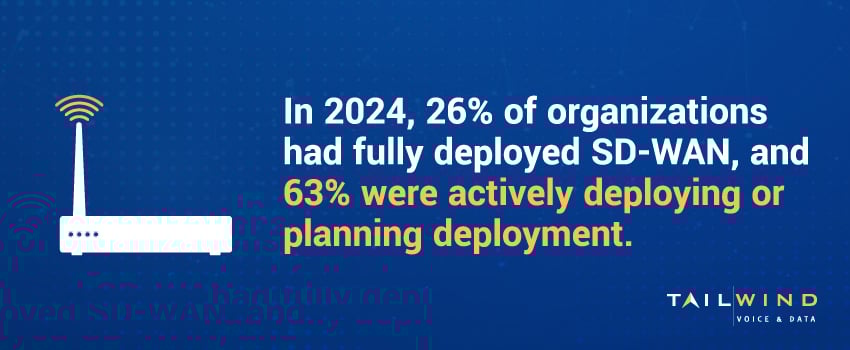
That’s why SD-WAN adoption is accelerating. SD-WAN has become standard infrastructure for distributed enterprises. In TeleGeography's latest WAN Manager Survey, 65% of enterprises had installed SD-WAN on at least part of their network, and 51% had rolled it out across all or most of their sites.1 And it’s no wonder, as SD-WAN offers a more flexible, software-driven approach that improves performance, strengthens security, and lowers costs.
Read on to learn what SD-WAN is, how it works, and deployment tips to help you decide whether it's the right fit for your organization.
SD-WAN Meaning: What Is SD-WAN?
SD-WAN, short for Software-Defined Wide Area Networking, is a virtualized network architecture that securely connects multiple sites, data centers, and cloud platforms.
Traditional WANs rely on fixed connections – typically MPLS circuits – to route traffic to a central hub. While this approach made sense when everything was housed in the data center, it now slows things down. SD-WAN uses software to route traffic across different types of connections, including MPLS, broadband, fiber, LTE, or 5G, based on what’s working best at the moment.
In short, SD-WAN gives you better network visibility, stronger performance, and more flexibility without the WAN headaches.
How Does Software-Defined WAN Optimize Traffic?
Since traditional WANs send traffic from branch offices back through a central data center, it can lead to bottlenecks and poor cloud performance. With SD-WAN, you can:
- Send traffic down the best-performing path based on current conditions.
- Prioritize apps that need consistency, like VoIP or video calls.
- Route cloud traffic directly to providers like Microsoft 365 instead of detouring through a data center.
- Switch to backup connections automatically if the primary link slows down or fails.
The end result is faster apps, fewer disruptions, and happier users.
SD-WAN Explained: Key Components & Architecture
SD-WAN may sound complex, but it really comes down to a few building blocks:
Edge Devices
Edge devices are hardware or virtual appliances deployed at each location (branch offices, HQ, data centers) that handle local traffic routing and enforce network policies.
Centralized Controller
This cloud-based or on-prem controller provides a single interface to configure, manage, and monitor your entire WAN. It defines the business intent and distributes policies to all edge devices.
Orchestration & Analytics Layer
The orchestration and analytics layer collects telemetry from edge devices, analyzes performance, and automates network adjustments based on real-time conditions and pre-set thresholds.
Multiple WAN Transport Types
SD-WAN supports a mix of WAN connections (MPLS, cable broadband, 5G/LTE), which allows the network to choose the best path for each application.
SD-WAN vs WAN: What’s The Difference?
Here’s a quick side-by-side look at how SD-WAN stacks up against older WAN setups:
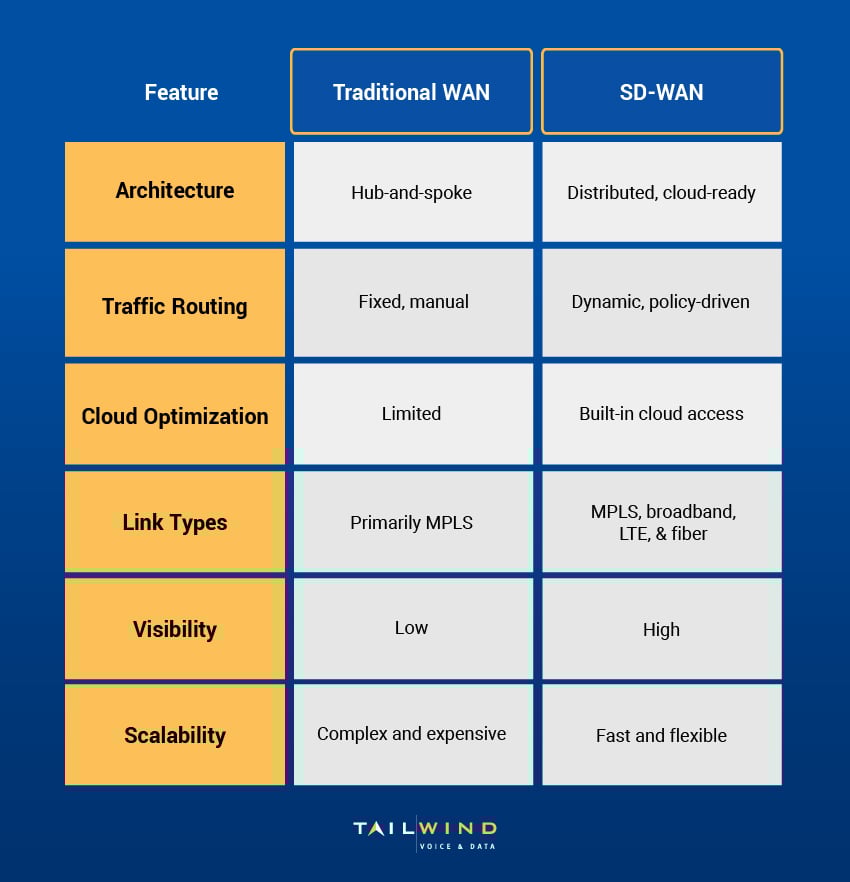
Traditional WANs worked fine when applications lived in a central data center and branches only needed a reliable way to connect back to headquarters. Today, cloud apps, remote employees, and bandwidth-heavy tools like video conferencing all demand more flexibility than this model allows.
SD-WAN is built to handle those needs, giving businesses a network that adapts to cloud-first environments, supports remote work models, and scales as new sites and users come online.
Top 6 SD-WAN Benefits
Here are the biggest benefits of switching to Software-Defined WAN solutions:
1. Improved App Performance
SD-WAN steers traffic across the best available path and prioritizes critical apps to ensure consistent, high-quality performance for VoIP, video, and cloud platforms.
2. Enhanced Network Reliability
SD-WAN supports active-active configurations and link redundancy, enabling instant failover without dropped calls or downtime.
3. Simplified Management
SD-WAN solutions give IT teams centralized control over the entire network via an intuitive dashboard, making it easier to monitor performance, push updates, and enforce policies across all sites.
4. Lower Connectivity Costs
Unlike MPLS-only WANs, SD-WAN can combine affordable broadband with existing circuits – helping businesses reduce total WAN spend without sacrificing performance.
5. Cloud & SaaS Optimization
SD-WAN routes cloud-bound traffic directly to providers like Microsoft 365, Salesforce, or AWS, avoiding detours and latency caused by backhauling through a data center.
6. Stronger Security Posture
Many SD-WAN solutions include integrated firewalls, encryption, segmentation, and secure access features that protect data across all edges.
How Secure Is SD-WAN? Risks & Best Practices
SD-WAN isn't secure on its own. It improves how traffic is routed, but the same features that make it flexible (local internet breakouts at each site, more connection types, more entry points) also widen the attack surface compared to a traditional hub-and-spoke WAN.
Where SD-WAN Introduces Risk
Traditional WANs backhauled traffic through a central data center, where security was inspected in one place. SD-WAN often sends traffic straight from a branch to the internet or a cloud app, which is faster but skips that central checkpoint. Dynamic path selection can also create visibility blind spots, since traffic doesn't always follow the fixed route your monitoring tools expect.
What Secure SD-WAN Adds
Many vendors now build security directly into the SD-WAN edge instead of leaving it to separate appliances. Look for:
-
Next-generation firewall (NGFW) and intrusion prevention at each site
-
Encryption for site-to-site and cloud-bound traffic
-
Network segmentation to contain a breach if one happens
-
Centralized policy management, so the same rules apply everywhere
Centralized control matters as much as any single feature, because it cuts the configuration errors that creep in when each location is set up by hand.
SD-WAN Security Best Practices
Treat security as part of the design, not an add-on. Choose a solution with built-in protection or pair SD-WAN with dedicated security tools from the start, enforce consistent policies across every site from the central controller, and keep full visibility into any traffic taking direct-to-internet paths. For many organizations, that combined approach points toward SASE.
The Role Of SD-WAN In SASE
SASE (secure access service edge) combines SD-WAN with cloud-delivered security in a single framework, and adoption is climbing fast. In TeleGeography's latest WAN Manager Survey, 53% of enterprises had adopted at least some elements of SASE. SD-WAN is the piece that makes the rest work.
How SD-WAN Fits Into SASE
SASE bundles several functions that used to live in separate boxes: SD-WAN for connectivity, plus security services like secure web gateway (SWG), cloud access security broker (CASB), zero trust network access (ZTNA), and firewall-as-a-service (FWaaS). SD-WAN is the networking foundation of that stack. It handles how traffic moves between users, sites, and cloud apps, while the security layers inspect and protect it. Without SD-WAN underneath, SASE has no intelligent transport layer to route and prioritize traffic.
SD-WAN vs SASE: What's The Difference?
SD-WAN is a networking technology. SASE is a broader framework that wraps networking and security together and delivers them from the cloud. Put simply, every SASE deployment includes SD-WAN, but not every SD-WAN deployment is part of SASE. If your main goal is connecting sites and optimizing traffic, SD-WAN may be enough on its own. If you also want consistent security policy for remote users and cloud access in the same system, SASE is the fuller path, and SD-WAN is where it starts.
SD-WAN Deployment Models
SD-WAN can be rolled out in different ways depending on your resources, compliance needs, and how much control you want over daily operations. Here are the three most common models:
On-Premises SD-WAN
With an on-premises SD-WAN, your IT team manages and hosts the networking components at each of your sites. This setup requires more IT effort upfront, but can be ideal for companies with in-house network teams and strict data control requirements.
Cloud-Managed SD-WAN
In a cloud-managed SD-WAN setup, your vendor hosts the orchestration and management plane in the cloud, while your sites use local edge devices. This approach gives organizations scalability and ease of use without requiring all the heavy lifting in-house.
Fully Managed SD-WAN
With a fully-managed SD-WAN, a provider handles all aspects of your network, from planning and deployment to troubleshooting and ongoing support. For businesses with limited internal IT staff or multiple distributed locations, this model offers the benefits of SD-WAN without needing deep technical expertise on staff.
SD-WAN Challenges & Limitations To Consider
SD-WAN delivers real gains, but it isn't a plug-and-play fix. Knowing the trade-offs up front helps you plan a smoother rollout.
-
Choosing the right vendor is hard. Dozens of solutions look similar on paper, and matching one to your specific sites, applications, and support needs takes real evaluation.
-
Performance depends on your underlay. SD-WAN routes intelligently, but it can only work with the connections you give it. Weak broadband or limited circuits at a site will still cap results.
-
Troubleshooting gets more complex. Dynamic, policy-based routing means traffic doesn't follow one fixed path, which can make pinpointing an issue harder without strong visibility tools.
-
Security isn't automatic. As covered above, basic SD-WAN needs added controls to stay safe at every direct-to-internet breakout.
-
Cost savings aren't guaranteed. Swapping MPLS for broadband can lower bills, but real ROI also depends on reduced downtime, simpler management, and the right deployment model for your team.
Most of these come down to planning and expertise, which is why many multi-location businesses lean on a managed or co-managed model rather than going fully DIY.
SD-WAN (Software-Defined Wide Area Networking) FAQs
What Is The Difference Between SD-WAN And A VPN?
Both encrypt traffic, but they solve different problems. A VPN creates a secure tunnel between two points, usually for remote access, and sends traffic over a single path. SD-WAN manages an entire wide area network: it routes traffic across multiple connections at once, picks the best path for each application in real time, and is controlled centrally across all your sites. A VPN is a point-to-point tool. SD-WAN is a full networking architecture that can include VPN-style tunnels as just one part.
What Is The Difference Between SD-WAN And SDN?
SDN (software-defined networking) is the broader idea of controlling a network through software instead of manual, hardware-by-hardware configuration. SD-WAN applies those principles specifically to the wide area network that connects your sites. In other words, SD-WAN is one practical use of SDN. SDN is often used inside data centers and campus networks, while SD-WAN focuses on branch-to-branch and branch-to-cloud connectivity across distances.
How Much Does An SD-WAN Solution Typically Cost?
Cost varies widely based on the number of sites, the connection types at each, and whether you run it yourself or use a managed provider. Pricing usually combines the SD-WAN service or licensing, the edge hardware at each location, and the underlying circuits (broadband, fiber, or LTE/5G). Many businesses lower overall spend by replacing or supplementing expensive MPLS with cheaper broadband, though the bigger savings often come from less downtime and simpler management. Pricing is best scoped against your actual site count and bandwidth needs.
When Does It Make The Most Sense To Adopt SD-WAN?
SD-WAN makes the most sense when you run multiple locations, rely heavily on cloud or SaaS apps, or feel the cost and rigidity of MPLS. It's also a strong fit if your IT team struggles with limited network visibility or slow, manual changes across sites. Businesses supporting remote and hybrid work, or planning to add new locations, tend to see the clearest benefit. If you operate from a single site with simple needs, a traditional connection may still be enough.
Is SD-WAN Still Worth It For Smaller Businesses?
Yes, often more so than for large enterprises. Smaller and mid-sized businesses usually lack big in-house network teams, so SD-WAN's centralized management and automatic failover remove a lot of manual work. Cloud-based and fully managed options keep upfront costs low and don't require deep technical expertise on staff. For a growing business with a few locations, SD-WAN can deliver enterprise-grade reliability and performance without an enterprise-sized budget.
What Is A Real-World Example Of SD-WAN In Use?
Consider a retail chain with 40 stores. Each location needs reliable point-of-sale, cloud inventory, and video. With SD-WAN, every store runs both broadband and an LTE backup. The network sends payment traffic down the most reliable path, prioritizes it over less critical traffic, and fails over instantly if a line drops, so checkout never stops. IT manages all 40 sites from one dashboard instead of configuring each store by hand. That mix of prioritization, failover, and central control is SD-WAN in everyday use.
Does SD-WAN Remove The Need For A Separate Firewall?
Not always. Some SD-WAN solutions include a built-in next-generation firewall at the edge, which can replace a standalone firewall at smaller sites. Others handle only routing and still need dedicated security alongside them. Even when SD-WAN includes firewall features, many organizations add layered protection, especially where traffic breaks out directly to the internet. Check whether your specific SD-WAN solution includes integrated security or expects you to provide it.
What Is The Downside Or Risk Of Using SD-WAN?
The main risks are security and complexity. Basic SD-WAN isn't secure by default, so direct-to-internet connections at each site can widen your attack surface without added protection. Dynamic routing can also make troubleshooting harder and create visibility gaps. On top of that, results depend on the quality of your underlying connections, and promised cost savings aren't automatic. Most of these are manageable with good planning, the right vendor, and built-in or layered security.
Why Partner With TailWind For Your SD-WAN Solution
The right SD-WAN solution can help your organization support growth, strengthen security, and maintain reliable performance without adding unnecessary complexity. For many IT leaders, it’s become a must-have for building a network that’s easier to manage and better aligned with the cloud-first world.
At TailWind, we help multi-location businesses plan, deploy, and manage SD-WAN solutions that improve performance, lower costs, and scale with your needs. From site surveys and circuit aggregation to network design and 24/7 support, we handle the complexity – so you don’t have to.
Contact us today to learn how our SD-WAN services can streamline your network and support your long-term goals.
Sources: