The symptoms of packet loss are easy to recognize: choppy voice calls, frozen video streams, and web pages that load halfway and stall. Unfortunately, the cause behind them is rarely as straightforward as the user-side experience suggests.
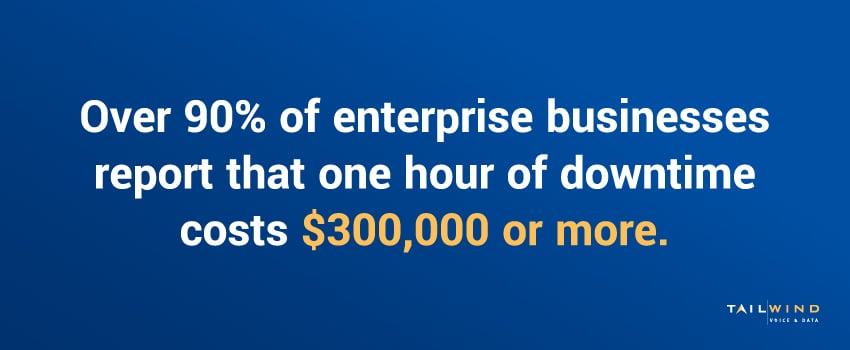
Over 90% of midsize and large enterprises report that a single hour of downtime costs them $300,000 or more,1 and connectivity problems like packet loss are a frequent trigger. In this guide, we’ll break down the meaning of packet loss, its real-world effects on multi-location enterprises, and what you can do to diagnose and resolve it.
What Is Packet Loss? Packet Loss Meaning Explained
Packet loss occurs when data packets traveling across a network fail to reach their destination. In networking, all communication – voice, video, email, file transfers, web traffic – is broken into small units called packets, each of which travels independently across the network and is reassembled in the correct order at the receiving end. When packets fail to arrive, get corrupted in transit, or take so long that the receiving system discards them, the result is packet loss.
In practical terms, the meaning of packet loss is the percentage of packets that don't make it from sender to receiver. For instance, a 1% packet loss rate would mean that one out of every hundred packets is lost. That sounds small – and for some applications it is – but for real-time traffic like voice and video, even modest packet loss is immediately noticeable as degraded call quality, dropped video, or stuttering audio.
What Does Packet Loss Mean for Your Network?
Different applications tolerate different thresholds before performance degrades noticeably. Here's what is generally considered acceptable packet loss for the most common enterprise traffic types:
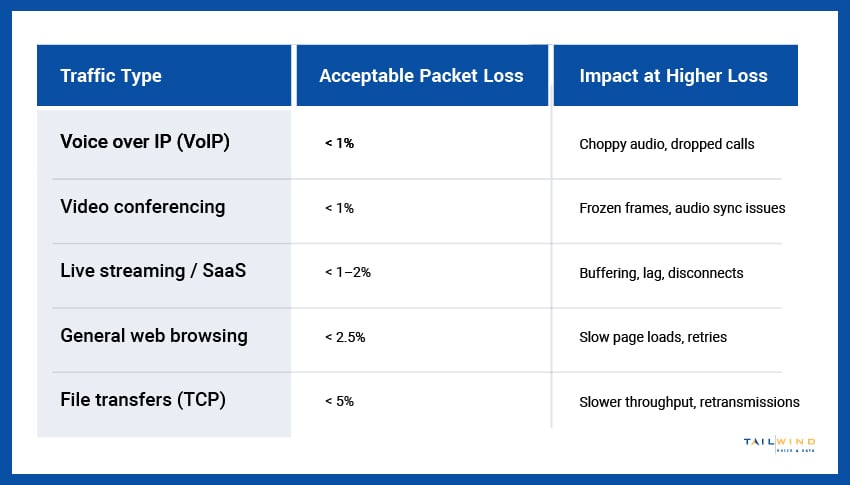
These thresholds explain why the same network can feel fine for email and unusable for a video conference at the exact same moment. Real-time applications have the least tolerance, so they're where packet loss shows up first.
What Causes Packet Loss?
Packet loss has multiple potential causes, and identifying the right one is essential to fixing the problem. Most sources fall into these five categories:
Network Congestion
When network bandwidth is saturated, meaning too much traffic for the available capacity, switches and routers will run out of buffer space and drop packets to compensate. This is the single most common cause of packet loss in commercial networks, particularly during peak usage hours.
Hardware Issues
Failing or undersized network equipment – switches, routers, NICs, even bad cables – drops packets. Aging hardware approaching end of life, switches running hot, or undersized equipment that can't handle current traffic volumes are all common culprits.
Wireless and Cabling Problems
On WiFi networks, interference, signal weakness, and channel congestion cause packet loss. On wired networks, damaged cables, poor connector terminations, exceeded cable run lengths, and EMI interference do the same.
ISP and Carrier-Side Issues
Packet loss can also originate upstream – congestion at the carrier level, problems with backbone routing, or peering disputes between providers. These are often the hardest to diagnose because the problem isn't on your network at all.
Software and Configuration Errors
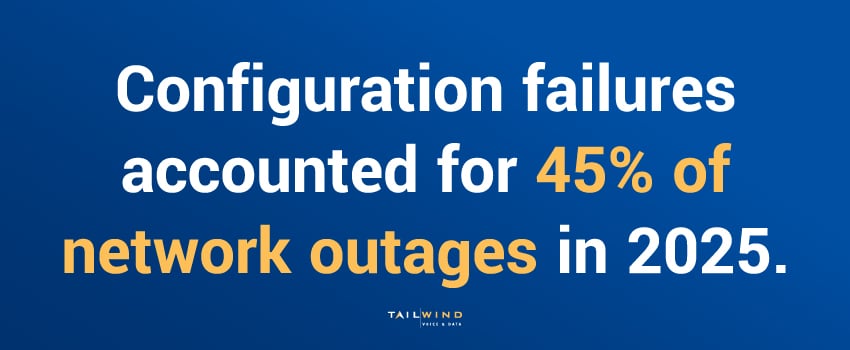
Misconfigured QoS policies, firewall rules that drop legitimate traffic, outdated firmware, and routing table errors can all cause packet loss that typically only affects certain traffic types or destinations. This category is a bigger issue than many teams assume, considering configuration failures accounted for 45% of network outages in 2025.²
How High Packet Loss Affects Business Operations
The business impact of high packet loss varies by application, but for most enterprises, the consequences show up across these areas:
- Voice and Video Quality: VoIP calls become choppy or drop entirely, and video conferences may freeze, pixelate, or lose sync between audio and video.
- Cloud App Performance: SaaS platforms – CRM, ERP, file sharing – become slow, unresponsive, or fail to load entirely.
- Productivity Loss: When connectivity is unreliable, employees spend time troubleshooting, restarting applications, and working around the problem instead of doing their actual jobs.
- Customer Experience Impact: For customer-facing environments like retail, hospitality, and healthcare, connectivity issues can cause point-of-sale failures and missed transactions.
- IT Support Burden: Intermittent packet loss generates tickets that are difficult to reproduce or trace, consuming significant IT resources without clear resolution.
Individually, any one of these is a nuisance. But when they happen across dozens or hundreds of locations, they add up to recurring revenue and productivity loss.
How To Fix Packet Loss: 4 Diagnostic and Resolution Steps
Fixing packet loss is a process of elimination, identifying where the loss is occurring and addressing the root cause rather than treating symptoms. Here's the standard diagnostic approach:
Step 1: Measure and Confirm
Use tools like ping (with extended packet counts), traceroute, or specialized network monitoring platforms to confirm packet loss is actually occurring and at what rate. Test from multiple locations and at different times to identify patterns.
Step 2: Isolate the Source
Run traceroutes to determine where in the network path packets are being dropped. Is the loss happening on your LAN, at the demarc, on the carrier circuit, or upstream at the ISP? Each requires a different fix.

Step 3: Address Internal Issues
If packet loss is happening on your internal network:
- Check for hardware faults like bad ports or damaged cables
- Make sure QoS configuration is prioritizing voice and video traffic
- Review your WiFi signal strength and interference sources
- Confirm that equipment isn't overheating or undersized for the current load
- Update firmware and review configuration changes
Working through these systematically helps rule out the internal causes one at a time, so that anything left over points clearly to the carrier.
Step 4: Engage Carrier for Upstream Issues
If it’s a carrier-side issue, the path to resolution will run through your carrier – a process that's often slow, frustrating, and inconclusive without good documentation. This is one of the most common reasons enterprises consolidate carrier management with a partner.
At TailWind, our carrier services team manages carrier escalations on your behalf, with the relationships and ticket history to actually drive resolution.
How To Reduce Packet Loss Across Multi-Location Networks
Once you've fixed an immediate packet-loss problem, the next step is to prevent it from recurring. Long-term packet loss prevention comes down to building infrastructure that's resilient by design:
- Right-Size Your Bandwidth: Provision enough capacity to handle peak load without saturation.
- Implement Proper QoS: Prioritize voice, video, and other real-time traffic so it gets bandwidth even when the network is busy.
- Standardize Cabling and Infrastructure: Properly installed, certified structured cabling eliminates one of the most preventable sources of intermittent packet loss.
- Refresh Aging Equipment Proactively: Switches and routers running at the edge of their capacity, or past end-of-life, are reliable sources of network problems.
- Monitor Continuously: Real-time network monitoring catches packet loss issues before users report them, often before they reach the threshold of noticeable impact.
The root cause of packet loss can differ by site for multi-location businesses: aging equipment in one location, undersized circuits in another, and wireless interference in a third. Troubleshooting and solving these problems requires consistent infrastructure standards, centralized monitoring, and the operational capacity to dispatch technicians to the sites where on-site intervention is needed.
TailWind’s field services team simplifies troubleshooting for multi-location packet loss issues by coordinating the on-site diagnostics, repairs, and equipment replacements that resolve packet loss issues nationwide, with consistent quality and documented resolution.
Tired of Chasing Packet Loss Issues? TailWind Can Help
Packet loss isn't a single problem with a single fix. It's a symptom of infrastructure issues that surface across applications, locations, and user complaints. Resolving it requires the right diagnostic process, carrier relationships, and operational capacity to act on what the diagnostics tell you.
That combination is what we bring to the table. TailWind’s NOCaaS (Network Operations Center as a Service) provides 24/7 proactive monitoring and incident response – identifying and resolving packet loss issues before they become support tickets.
If packet loss is affecting your business across one location or many, our team is ready to help. Get in touch to get started, and let's build a network that performs the way your business needs it to.
Sources: