On paper, your bandwidth looks fine. Your network monitoring shows acceptable latency. And yet voice calls cut out, video conferences lag, and remote applications behave erratically. The culprit is often jitter – one of the most overlooked but impactful network performance issues affecting modern enterprises.
Understanding what network jitter is, what causes it, and how to systematically reduce it is essential for any business depending on real-time communications and cloud applications to operate. Read on to learn what jitter is, what causes it, and how to fix it across your network.
TL;DR
-
Network jitter is the variation in delay between data packets arriving at their destination, measured in milliseconds, and it disrupts real-time traffic like VoIP and video far more than file downloads or web browsing.
-
In most enterprise environments, sustained jitter above 30 ms on voice or video traffic is worth investigating, since jitter buffers in modern VoIP and video systems can smooth out lower levels.
-
Configuring QoS to prioritize real-time traffic is the single highest-impact fix for most jitter problems, alongside right-sizing bandwidth, moving critical devices to wired connections, and replacing aging switches and routers.
What Is Network Jitter?
Network jitter is the variation in delay between data packets arriving at their destination. In a healthy network, packets arrive at consistent, predictable intervals. When jitter is present, those intervals vary – some packets arrive quickly, others lag, and some arrive in bunches followed by gaps. Jitter is typically measured in milliseconds (ms).
Latency is how long it takes a single packet to travel from A to B, while jitter is the inconsistency between packets, meaning how much that travel time varies from one packet to the next. Applications that don't depend on timing, such as file downloads and web browsing, won't show moderate jitter at all. Real-time traffic, like voice and video, is where jitter breaks the user experience.
What Is Jitter In Networking?
Different applications tolerate different levels of jitter before performance degrades. Here's where the thresholds typically land for common enterprise traffic:
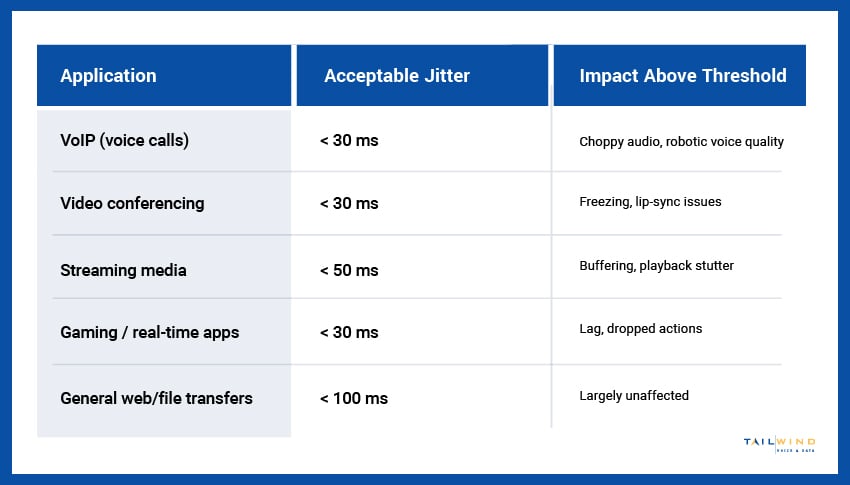
In most enterprise environments, sustained jitter above 30 ms on voice or video traffic is a problem worth investigating. Below that threshold, jitter buffer technology in modern VoIP and video systems can smooth out variations without users noticing.
What Causes Network Jitter?
Jitter has several root causes, and pinning down the right one is what separates a quick fix from months of recurring complaints. Here are the most common causes to look for first:
Network Congestion
The most common cause of jitter in commercial networks. When too much traffic competes for limited bandwidth, packets get queued unpredictably – some pass through quickly, others wait. The result is variable delay, which is exactly what jitter is.
Inadequate Quality of Service (QoS)
Without QoS configured to prioritize real-time traffic, voice and video packets compete with bulk traffic like file transfers and backups. Even on a healthy network, this competition introduces timing variability that shows up as jitter on the calls and video streams.
Wireless Interference & Weak Signal
On WiFi networks, signal degradation, channel congestion, and interference from other devices cause retransmissions and variable packet timing. Wireless jitter is one of the most common reasons VoIP calls work fine on a wired connection but stutter when a user is on WiFi.
Carrier-Side Issues
Jitter can also originate upstream – congestion or routing changes at the ISP or backbone level. These are the hardest issues to resolve because they aren't on your network at all.
Network Jitter vs Latency: What's The Difference?
Network jitter and latency are related but distinct concepts that get confused regularly:
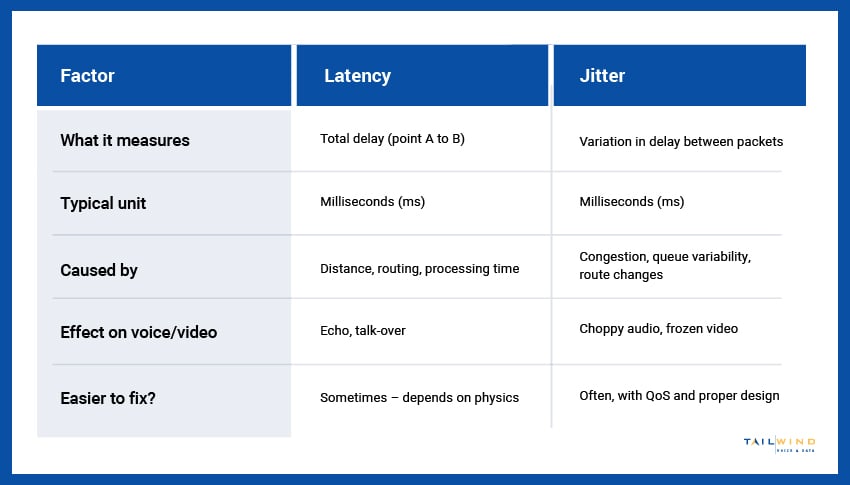
A network can have low latency and still suffer from high jitter, and vice versa. Most real-time application problems trace back to jitter more often than to absolute latency, because applications can adapt to consistent delay but struggle with inconsistent delay.
How To Fix Network Jitter
Fixing jitter is a process of identifying where timing variability is introduced and addressing it at the source. The standard sequence:
- Measure and Confirm: Use network monitoring tools or VoIP test platforms to measure jitter on the connections actually experiencing problems. Test from multiple locations and at different times of day.
- Implement or Fix QoS: Configure your routers and switches to prioritize voice, video, and other real-time traffic. This is the single highest-impact change for most jitter problems.
- Right-Size Bandwidth: Sustained utilization above 70–80% of available bandwidth is a leading indicator of jitter-inducing congestion. Increase capacity or shift workloads off saturated links.
- Move Critical Traffic to Wired Connections: VoIP desk phones should always be wired, not on WiFi. Video conferencing rooms benefit from wired uplinks where possible.
- Replace Aging Hardware: Switches and routers at or past end of life are common jitter sources. Equipment refresh is preventive maintenance, not optional infrastructure spending.
- Escalate Carrier Issues With Data: If jitter originates upstream, your carrier needs documented measurement data to take the ticket seriously.
For enterprises managing multiple locations, TailWind’s carrier services team handles those carrier escalations on your behalf – with the relationships and ticket history to drive resolution rather than wait for it.

Network Jitter FAQs
What Is Network Jitter?
Network jitter is the variation in delay between data packets as they arrive at their destination, measured in milliseconds (ms). On a healthy network, packets show up at steady, predictable intervals. With jitter, that rhythm breaks: some packets arrive quickly, others lag behind, and some come in bunches followed by gaps. Applications like file downloads and web browsing barely register moderate jitter, but voice and video traffic depend on consistent timing, so that’s where the problem becomes obvious.
What Is An Acceptable Level Of Network Jitter?
For voice and video traffic in most enterprise environments, sustained jitter above 30 ms is worth investigating. Below that level, the jitter buffers built into modern VoIP and video systems can usually smooth out the variation before users notice anything, so a reading around 20 ms typically won’t cause problems on its own. Tolerance does vary by application, though. Real-time traffic is far more sensitive than file transfers or browsing, which can absorb much higher jitter without any visible impact.
What Is The Difference Between Jitter And Latency?
Latency is the time it takes a single packet to travel from one point to another. Jitter is how much that travel time varies from one packet to the next. The two are related but independent, so a network can have low latency and still suffer from high jitter, or the reverse. Jitter is usually the bigger problem for real-time applications, because they can adapt to a consistent delay but struggle when the delay keeps changing.
What Causes Network Jitter?
Network congestion is the most common cause of jitter in commercial networks. When too much traffic competes for limited bandwidth, packets are queued unpredictably and arrive at uneven intervals. Missing or misconfigured QoS is another frequent source, since voice and video packets end up competing with backups and file transfers. Wireless interference and weak WiFi signals add retransmissions and timing variability, and some jitter originates upstream at the carrier or backbone level, outside your own network entirely.
How Do You Measure Network Jitter?
You measure jitter with network monitoring tools or VoIP test platforms that track the variation in packet arrival times, reported in milliseconds. Run the tests on the connections where users are actually reporting problems, rather than on a single link that looks representative. Test from multiple locations and at different times of day, since jitter often appears only during peak usage. Documented measurements also matter later if the issue turns out to be on the carrier’s side.
How Do You Fix Network Jitter?
Start by measuring jitter on the affected connections to confirm where it’s coming from. Then implement or correct QoS so routers and switches prioritize voice, video, and other real-time traffic, which is the highest-impact fix for most jitter problems. If links regularly run above 70 to 80% utilization, add capacity or move workloads off them. Put VoIP desk phones on wired connections, replace switches and routers at or past end of life, and escalate upstream issues to your carrier with measurement data.
Why Does Jitter Affect VoIP And Video Calls The Most?
Voice and video are real-time traffic, so every packet needs to arrive in a steady sequence for audio and video to play back smoothly. When packet timing varies, calls cut out, voices sound choppy, and video freezes or lags. Applications that don’t depend on timing, such as file downloads and web browsing, simply wait for the data and show no visible effect from moderate jitter. That’s why a network can feel fine for everyday work while calls keep breaking up.
Does WiFi Cause More Jitter Than A Wired Connection?
Yes, wireless networks are more prone to jitter than wired ones. Signal degradation, channel congestion, and interference from other devices force packets to be retransmitted, which creates uneven arrival times. That’s one of the most common reasons a VoIP call sounds fine on a wired connection but stutters once the user switches to WiFi. For that reason, VoIP desk phones should always be wired, and video conferencing rooms benefit from wired uplinks wherever possible.
Can Network Jitter Come From Your Internet Provider?
Yes, jitter can originate upstream from congestion or routing changes at the ISP or backbone level. These carrier-side issues are the hardest to resolve because they sit outside your network, so no amount of internal tuning will fix them. The most effective response is to escalate with documented measurement data, showing when and where the jitter occurs. Carriers are far more likely to act on a ticket backed by clear evidence than on a general complaint about call quality.
Diagnose Jitter On Multi-Location Networks With TailWind
Jitter is one of those infrastructure problems that's easy to overlook and difficult to resolve once it's affecting users. Getting it under control requires the right diagnostic tools, the right network design, and the operational capacity to act on what your monitoring tells you.
Enterprises with operations across multiple sites often see jitter present as inconsistent quality from site to site – fine at headquarters and problematic at branch locations. The causes can vary across each location, such as undersized circuits at one location, missing QoS at another, and aging switches at a third.
At TailWind, our NOCaaS solution provides 24/7 proactive monitoring across all your sites. We’ll identify jitter issues before users report them and coordinate field services dispatch when on-site intervention is required.
If jitter is affecting performance across your locations, our team is ready to help. Get in touch to get started – and let's build a network that performs reliably for every application.